I can't use button Y when copy Ctrl + C + Y

Before I use Ctrl + C and Y to copy an image but now it's not working. How can I fix?

모든 댓글 (2)
The most likely reason for this is that there is more than one "Y" hotkey (AKA accesskey) on the menu. Firefox 159 now assigns accesskeys to add-ons. If you press Y a few times, can you see Firefox cycling between multiple menu items? To activate a selected menu item, you can press Enter, but that isn't very convenient.
The developers are aware of these conflicts and work is under way to resolve it, for example, by assigning numbers to add-on entries rather than letters. But that might take a couple months to arrive.
In the meantime, how important is the add-on entry that uses Y? Maybe it can be removed without disabling the extension, or maybe the author can make that possible soon, or perhaps you prefer to disable the extension.
Related threads with the same problem:
선택된 해결법
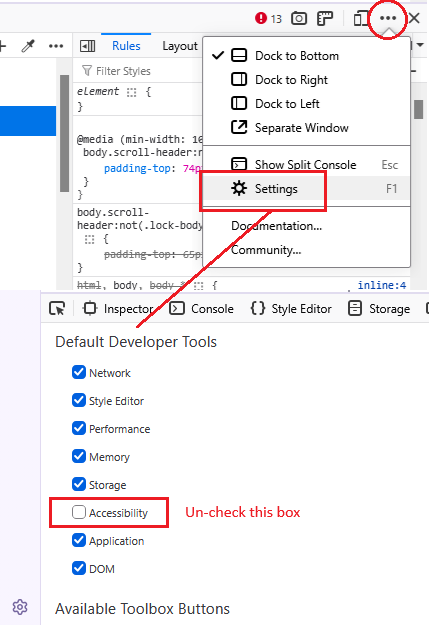
Hmm, I see one problem is the Accessibility Inspector, which is a built-in developer tool. If you do not use the Accessibility features in the developer tools, you can remove this menu item by turning off that feature. Here's how:
Open the Developer Tools panel using either:
- main menu button > More Tools > Web Developer Tools
- Ctrl+Shift+i
On the right side, click the ••• menu button and click Settings.
Then on the left side, un-check the box for Accessibility.
Apologies for not taking the time to translate these phrases. Hopefully you can find them.