


Open
How to change the tabs at the top?

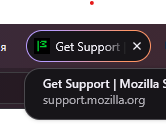
Hi, I recently opened my browser and noticed that all the tabs are now rounded instead of rectangular. I'd like to restore them to their original appearance, but I can't find anywhere how to do it.
Hi, I recently opened my browser and noticed that all the tabs are now rounded instead of rectangular.
I'd like to restore them to their original appearance, but I can't find anywhere how to do it.
모든 댓글 (1)
Hi tarasanim2010,
We just had a major redesign with the release of version 157. You can learn more about that in this blogpost.
If you'd like to advocate for the ability to adjust the roundness, I’d suggest voting for this idea on Mozilla Connect, our feedback platform.