


Windows 10 reached EOS (end of support) on October 14, 2025. If you are on Windows 10, see this article.

Mozilla 도움말 검색

고객 지원 사기를 피하세요. 저희는 여러분께 절대로 전화를 걸거나 문자를 보내거나 개인 정보를 공유하도록 요청하지 않습니다. "악용 사례 신고"옵션을 사용하여 의심스러운 활동을 신고해 주세요.

자세히 살펴보기
열기

Unable to save screen capture as PDF using fireshot

tmnnpyrm59

I use Fireshot on my Mac to take screenshots and normally save as PDF. This works fine using Safari and Chrome browsers. However, using Firefox, when saving the screenshot as a PFD it uses file type 'All files' Up till now, I have been unable to open the file saved as an 'All files' document. But this morning, saving the capture as a PDF 'All files' type, has saved the document as a PDF.

QUESTION: Just using Firefox, why does saving a screen capture uses 'All files' when saving as a PDF. And has the issue been noted and resolved, but the All files file type still shown? NOTE: The drop-down arrow on Format does not offer any alternative.
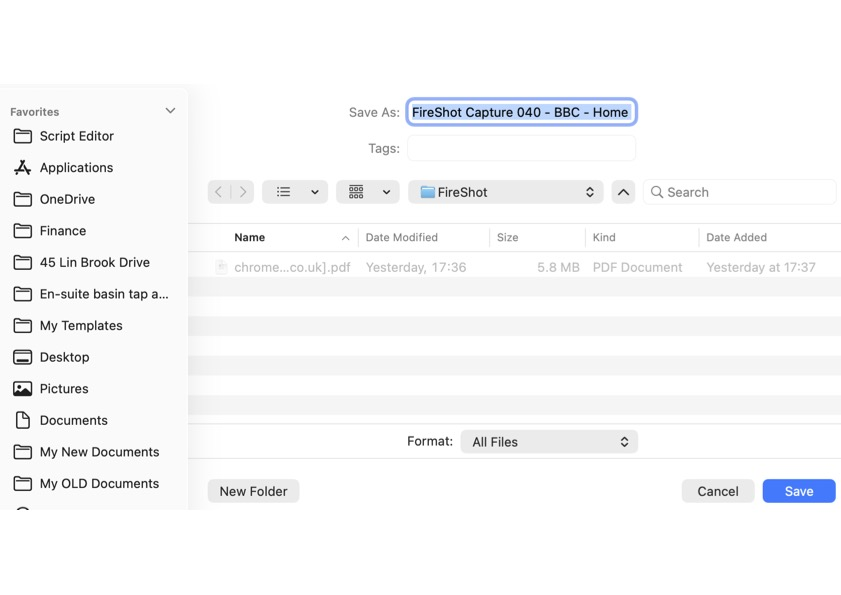
I use Fireshot on my Mac to take screenshots and normally save as PDF. This works fine using Safari and Chrome browsers. However, using Firefox, when saving the screenshot as a PFD it uses file type 'All files' Up till now, I have been unable to open the file saved as an 'All files' document. But this morning, saving the capture as a PDF 'All files' type, has saved the document as a PDF. QUESTION: Just using Firefox, why does saving a screen capture uses 'All files' when saving as a PDF. And has the issue been noted and resolved, but the All files file type still shown? NOTE: The drop-down arrow on Format does not offer any alternative.
첨부된 스크린샷

모든 댓글 (1)

All files is because your screenshot doesn't have a definitive type I imagine. See if you can set the screenshot to another option

질문하기

글에 답글을 달기 위해서는 계정으로 로그인해야만 합니다. 계정이 아직 없다면 새로운 질문을 올려주세요.