


Open
Bidirectional text in bookmark menus just got buggy

Today's update (version 154.0, 18 Aug 2026), degraded the appearance of a bookmark menu that contains both left-to-right and right-to-left text.
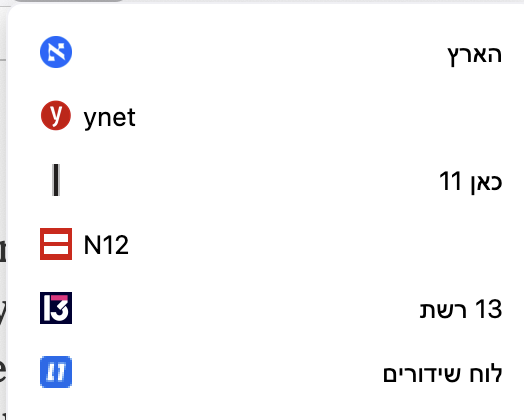
I have bookmarks in both English and Hebrew text. When a bookmark menu contains both kinds, all of them used to be left-aligned, which made for a tight, easy-to-read. menu. But as of this version, the R2L text is right-aligned, so if the whole menu is a bit wide, there is a lot of empty space. See screenshot.
Also, the next-to-last line in the screenshot, the numbers to the LEFT of the text, not right.
Today's update (version 154.0, 18 Aug 2026), degraded the appearance of a bookmark menu that contains both left-to-right and right-to-left text.
I have bookmarks in both English and Hebrew text. When a bookmark menu contains both kinds, all of them used to be left-aligned, which made for a tight, easy-to-read. menu. But as of this version, the R2L text is right-aligned, so if the whole menu is a bit wide, there is a lot of empty space. See screenshot.
Also, the next-to-last line in the screenshot, the numbers to the LEFT of the text, not right.
모든 댓글 (2)

Please can you file a bug at https://bugzilla.mozilla.org/ about this?
