


Archive options compared to desktop

Hello,
I'm not sure where to go with feature requests, I didn't find that at all on my mobile... But, let me shoot, and you shoot me down if I wasted your time.
- I would like to be able to archive directly from the Android notification. That's currently not an option.
- I would love to have the time stamped directory option for archiving that we have on desktop. Right now on Android we can only go the to the "archive" directory.
So, what I really do now, as I read most of my e-mails on mobile, but do some specific processing on desktop, is mark it either as read or archive it on mobile. Then I go to desktop and archive it again...
Yours sincerely,
Stefan
모든 댓글 (2)

선택된 해결법
Hi Stefan
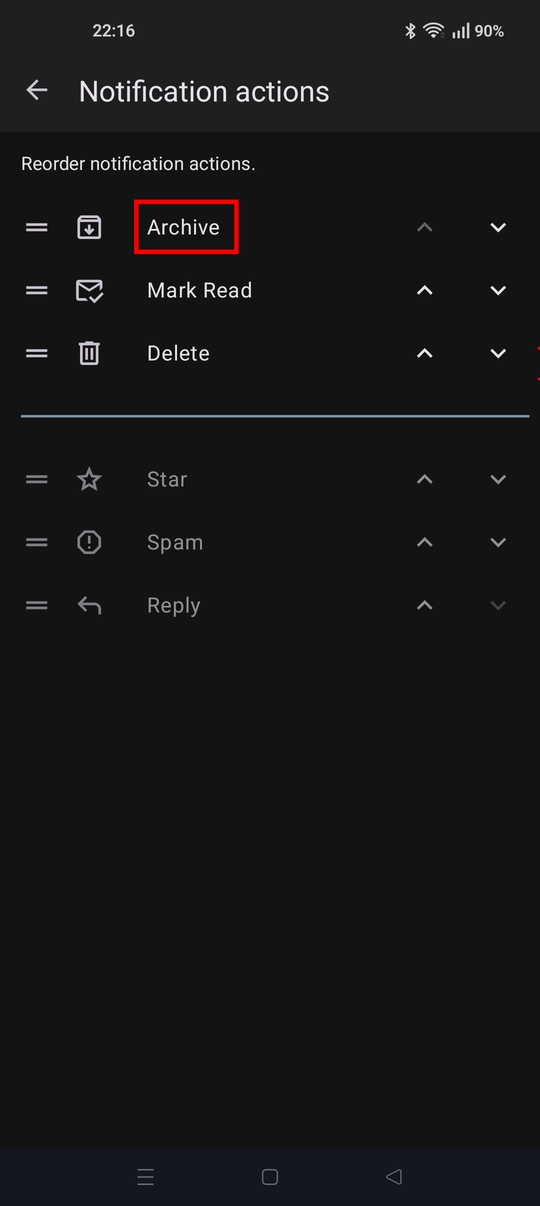
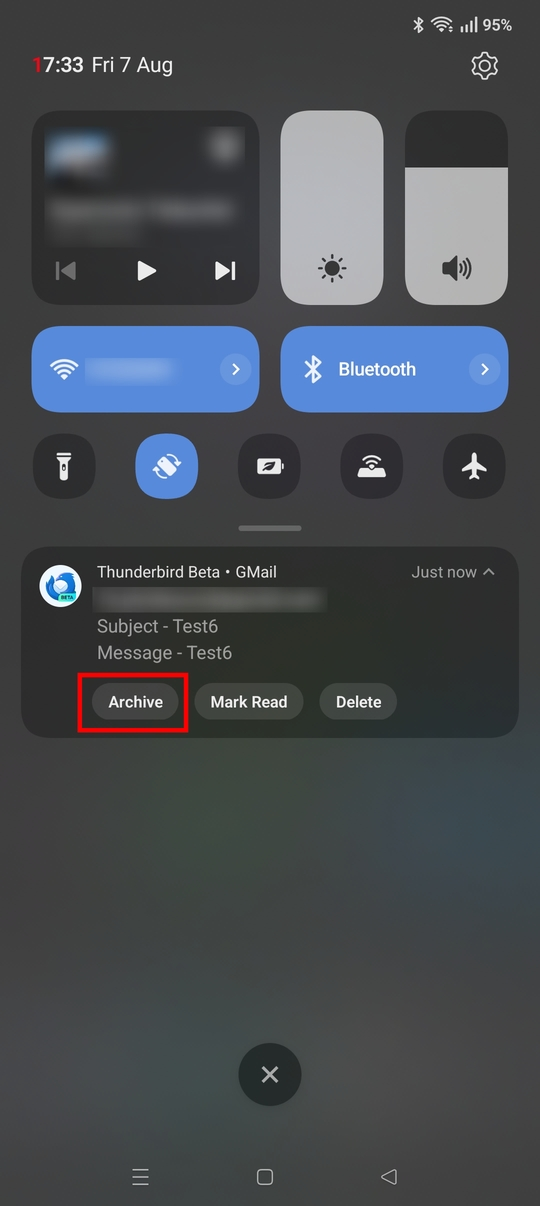
1. You'll be pleased to know that archiving directly from the notification IS available. First you need to add "archive" as one of the three notification actions. Navigate to settings > general settings > notifications: Notification Actions.
Once added, an archive button will be available on the notification. See the attached screen shots.
2. I'm not a TB desktop user so not familiar with the "time stamped directory option for archiving". There's nothing in the mobile app currently beyond basic archiving.
There is a app feature under development that may be what your thinking of. It proposes to create date stamped archives, rather than time stamped ones. See the below link for more info. No guarentee if/when it will be implemented.
https://github.com/thunderbird/thunderbird-android/pull/10113
3. The best place to raise feature requests and share ideas is on Mozilla Connect. Community members can then vote for them.
https://connect.mozilla.org/t5/ideas/idb-p/ideas/label-name/thunderbird%20android
Hello,
I feel so silly to not have spotted the first one. I did check all the settings, so I thought, numerous times over various days. So, that's great that it's already there, thanks a lot for pointing that out!
The second one is indeed exactly what I meant. I wasn't aware there's also a whole thing on GitHub, I'll try to keep that in mind for next time. Thanks for sharing, I now know at least it's on the radar.
And a final thanks for letting me know for feature requests. I'm good case that's not needed, but good to know. But since I find the link hard to find, maybe in the future I'll bug you once more...
Yours sincerely,
Stefan