


Constant notifications re virus

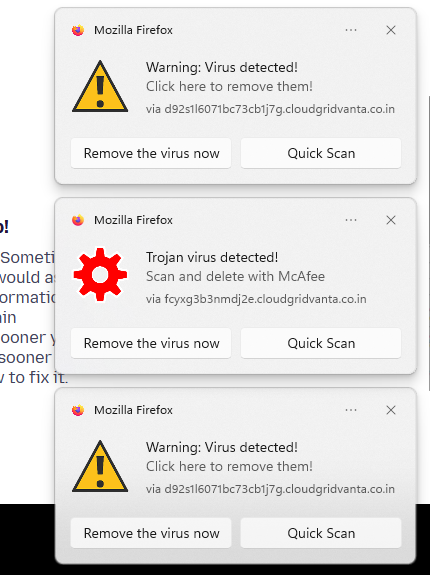
I've suddenly started getting continuous pop-up notifications warning of a virus, a trojan virus, system alert, etc. Some mention McAfee (I use Total AV and have run scans and it says there are no problems). THese bitufucatuibs sat they are coming from Firefox. They are just constant and even when I delete them they just keep coming. What's going on?
모든 댓글 (3)
The screen and description shows they are just web push notifications from sites you have allowed to send you notifications. unfortunately instead of getting useful information some sites may send you spam, junk, fake virus/trojan alerts etc. You can revoke these sites from sending you notifications.

How do I know which site is really sending the notifications? They come thru Firefox supposedly, but shouldn't the Microsoft facility that manages the Notification area have a log -hopefully of source?
bpatter0768 said
How do I know which site is really sending the notifications? They come thru Firefox supposedly, but shouldn't the Microsoft facility that manages the Notification area have a log -hopefully of source?
If you look at the screen shot example in the OP you should see the mention of the url the notification are from. That is the site you need to revoke to stop the notifications or just block or remove all sites that you have allowed as explained in the KB article in my previous reply above.
글쓴이 On Break --- Veteran Moderator 수정일시