


How do I fix extension popups in wayland?

I'm on Debian 13 stable with firefox nightly (tarball) downloaded from the firefox website with firefox running on wayland. I don't recall the exact time / build that this issue happened, but it has been persistent for over a week or two already.
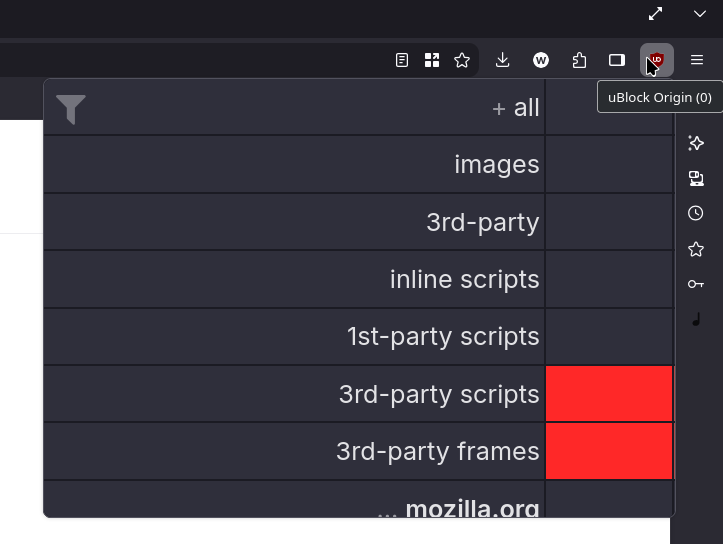
The issue I am seeing is where secondary menus or popups do not scale properly in firefox. This includes Popups for extensions, right click menus, or even link previews (long click left mouse btn).
<See screenshots>
---
Things I tried with no luck:
- Restarting my computer
- Restarting firefox / Updating firefox from the firefox website (https://www.firefox.com/en-US/channel/desktop/)
- Changing my display scale (100%) to (90%)
- Changing firefox display scale from (130%) to (100%)
- Refreshing firefox through the settings (aka clearing extensions and all the other stuff)
- Switching to X11 and back to Wayland... X11 worked fine, but back to Wayland just got things borked again
- Updating all system packages on Debian (nothing much except for security updates on debian stable)
Now the questions I have:
1. Is there a way to fix this issue? 2. Where could I file a bug for this issue? 3. Are there other people with this same issue?


모든 댓글 (4)
선택된 해결법
Thank you, we're tracking this issue under bug 2035152. There are some workarounds proposed.
Thanks for the heads up! Seeing the workaround, I guess I forgot the scaling on my secondary monitor...
This is what fixed the issue for me as a temp workaround (not in any specific order, but they all work independent of each bullet item):
- Disable secondary monitor (that has the scaling NOT in 100%), then re-enable the monitor
- Change the scaling of the second monitor to 100%
- Moving the secondary monitor that is NOT scaled 100% to the RIGHT side of the primary monitor.
As per the latest comment , partial quote below:
> [...] if it ever turns up on a different Wayland compositor, that would warrant its own report [...]
I guess I'll need to file a new bug, as this is happening on KDE Wayland?