Automatically deleting sites from History

Hello. I'm not sure if this is the correct place to bring up my concern. So, I apologize in advance if it's not.
I volunteer with a domestic violence organization. The group's website (180NJ.org) has a "panic button" function where a DV victim could bail out instantly if their abuser confronts them. When you hit the "Safety Exit" button, it changes the page to weather.com and Google comes up in a new tab. This is so an abuser can't see what the victim was looking at, for the victim's safety. When using Chrome and Edge, the DV site is removed from the History. When using Firefox, it is not removed from the History. I've brought this to the attention of the organization's IT people and was told that this is probably due to differences in the browsers themselves.
I'm not an IT person myself and have no idea what's involved in all of this. But, I just wanted to bring it to your attention, in case it's something you can work out. Thank you.
모든 댓글 (1)
Hi, could the folks who authored the solution post a webcompat.com report with some details about the expected features this ought to leverage?
I don't believe this can work reliably (Q+A: https://stackoverflow.com/questions/60812063/make-site-not-appear-in-history-through-code-not-user …) — basically if it "works" elsewhere for just the current, single page load, it won't really clean up if there was an entry from minutes ago, the user navigated a couple of pages, or closed the window themselves before.
The only solution really is using private browsing windows.
If this is about even just the stack under the "weather.com" back/forward history, then the site would need to work in a way to not expose states etc. which is quite cumbersome for the users.
If the authors have any implementation details in mind, please send them over to either this thread, the bugzil.la tracker or the webcompat.com site to submit a behavior difference they'd like to elaborate on.
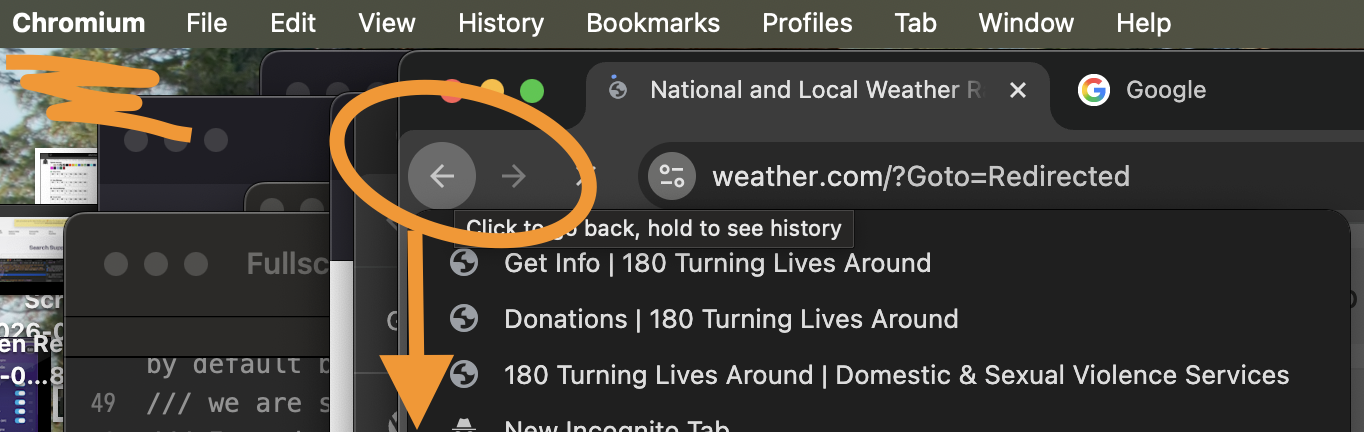
I however do not see what you're describing even in a Chromium–based browser, that location stack is still there in the back/forward history, attached: