


Thunderbird desktop switched to ESR release erroneously. Why?

My reddit post is here: https://www.reddit.com/r/Thunderbird/s/lM11YcRIIT
Hello,
I'm confused and slightly concerned.
Through no deliberate action by me, Thunderbird DOWNGRADED itself from the May 2026 standard release version to an AUGUST 2025 ESR(Extended Support Release) version.
UPDATE: the next application restart brought the ESR version up to date, but why was I forced onto the ESR version?!
What could have pissibly triggered this? I don't want or need ESR, and without knowing the cause, I have e no guarantee it won't happen again. Worst if all, everywhere I look, there is zero explanation for this. It appears to be fairly unprecedented.
My original installer for 102.15.1 was downloaded from the official Thunderbird site in 2025.
The sequence of events:
- I've had Thunderbird version 102.15.1 installed for awhile, but wasn't using it.
- Ysterday I opened it and connected an account.
- Today I noticed it hadn't auto-updated, so I went into the settings and clicked on the 'check for updates'.
- this brought it up to v115.10.1.
- Its success was demonstrated by me being sent to this URL after it opened: https://www.thunderbird.net/en-US/thu.../?locale=en-US&version=115.10.1&channel=release&oldversion=102.15.1(https://www.thunderbird.net/en-US/thunderbird/115.0/whatsnew/?locale=en-US&version=115.10.1&channel=release&oldversion=102.15.1)
- An hour later, I closed Thunderbird completely hoping it would fix a sync that appeared 'stuck'.
- When I re-opened Thunderbird, I saw the small "updating" window. It was pretty surprising since I had *just* updated.
- After Thunderbird opens, after this additional "update", the URL that I'm sent to is this: https://www.thunderbird.net/en-US/thu.../?locale=en-US&version=128.14.0&channel=esr&oldversion=115.18.0(https://www.thunderbird.net/en-US/thunderbird/128.0/whatsnew/?locale=en-US&version=128.14.0&channel=esr&oldversion=115.18.0)
- Thunderbird changed to a year old ESR version!
모든 댓글 (5)
선택된 해결법
Maybe I missed something. The ESR of last summer was the first one. All releases mentioned in you post were older releases, not newer ones. What am I missing? Thank you.
V115.10.1 is the current May 2026 'monthly release.
I mention the earlier version (102) and where I download it from so it's clear how I was running that. The standard release version of 102 was installed. Not ESR. That's why it updated to v115.
Its entirely not clear what caused Thunderbird to then switch to the ESR channel. It first "updated" to the Aug2025 ESR release, before auto updating the latest ESR release v140.
That last detail may not be consequential to determining what caused me to be switched from standard to ESR. The problematic switch was going from 115 'standard' --> ESR automatically.
Ive connected a single email account to the desktop app and installed a single plugin, released this year and listed as compatible with v115. No other customization has been done.
The add-on if relevant: https://addons.thunderbird.net/en-CA/thunderbird/addon/mail-auth-info-viewer/
글쓴이 moz.defender447 수정일시
david said
Maybe I missed something. The ESR of last summer was the first one. All releases mentioned in you post were older releases, not newer ones. What am I missing? Thank you.
Wow. Sorry.
I see my mistake now. The most recent version is 151, not 115. The similarity is the source of all the confusion.
My original install version was even older than I thought. v102 came out in 2024.
What I can now see is that Thunderbird was attempting to incrementally update instead of jumping to the current version. At some point it incremently updated thte ESR release.
I just found this update log under 'settings/general/updates'.
It sort of explains what happened.
I'm just going to download the most recent installer version and do a clean re-install.
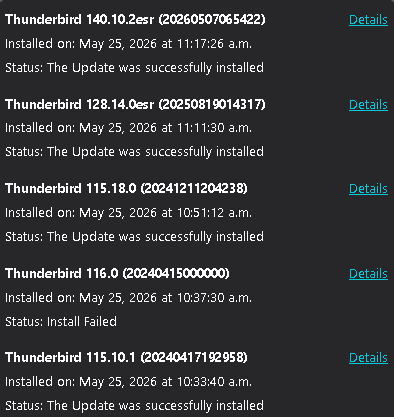
https://www.thunderbird.net/en-US/thunderbird/releases/
The Thunderbird 102 and 115 were essentially being released in a ESR fashion. It was not until Tb 136.0 that there was the Releases alongside ESR ?
The Tb 115.10.1 is old as it was released back on April 18, 2024. https://www.thunderbird.net/en-US/thunderbird/115.10.1/releasenotes/
It is Thunderbird 151.0 and 140.11.0esr that were Released on May 19, 2026
James said
https://www.thunderbird.net/en-US/thunderbird/releases/ The Thunderbird 102 and 115 were essentially being released in a ESR fashion. It was not until Tb 136.0 that there was the Releases alongside ESR ? The Tb 115.10.1 is old as it was released back on April 18, 2024. https://www.thunderbird.net/en-US/thunderbird/115.10.1/releasenotes/ It is Thunderbird 151.0 and 140.11.0esr that were Released on May 19, 2026
Ya, my many mistakes are now embarrassingly clear.
I've now done a fresh install of v151 and all is well.
As you noted, the purported 'auto-upgrade to ESR' is clearly explained. I was effectively on the old branch that became ESR as of v115.10.2esr. So of course it updated to the most current version of the ESR branch.
Sorry for the confusion!