


Is there a way to have VPN always on upon browser launch?

Hello all,
I am currently testing the new VPN feature in Firefox. I Is noticed that Firefox always starts with this integrated VPN being off. I searched but I didn't find any way to have it always on when launching VPN. Is that possible?
Thanks!
선택된 해결법
Hello Virtual Assistant!
Thank you for your suggestion. It did help and solve my request.
I had checked the available preferences available for the VPN configuration before asking but I did not noticed these ones! I suppose they were already available in version 150.0.2 as I got an update to version 150.0.3 in the meantime.
FYI, I also toggled to true the values of browser.ipProtection.autoStartPrivateEnabled and browser.ipProtection.autoRestoreEnabled. I manually changed the string content of browser.ipProtection.entitlementCache by replacing the first entry "autostart":false" with ""autostart":true" before restarting Firefox. Maybe this last string change in the cache would have been updated automatically by Firefox itself.
Thanks again.
모든 댓글 (17)
Hello
Try
1 - Go to configuration editor https://support.mozilla.org/en-US/kb/about-config-editor-firefox 2 - Enter a search term browser.ipProtection.autoStartEnabled You can double-click on the preference to set the value to true 3 - Enter a search term browser.ipProtection.features.autoStart You can double-click on the preference to set the value to true
Restart Firefox
Pierre2Grenoble said
Hello all, I am currently testing the new VPN feature in Firefox. I Is noticed that Firefox always starts with this integrated VPN being off. I searched but I didn't find any way to have it always on when launching VPN. Is that possible? Thanks!
Otherwise.
Use built-in VPN in Firefox https://support.mozilla.org/en-US/kb/built-in-vpn#w_where-can-i-get-help-or-give-feedback
선택된 해결법
Hello Virtual Assistant!
Thank you for your suggestion. It did help and solve my request.
I had checked the available preferences available for the VPN configuration before asking but I did not noticed these ones! I suppose they were already available in version 150.0.2 as I got an update to version 150.0.3 in the meantime.
FYI, I also toggled to true the values of browser.ipProtection.autoStartPrivateEnabled and browser.ipProtection.autoRestoreEnabled. I manually changed the string content of browser.ipProtection.entitlementCache by replacing the first entry "autostart":false" with ""autostart":true" before restarting Firefox. Maybe this last string change in the cache would have been updated automatically by Firefox itself.
Thanks again.
I'm not a virtual assistant, i am a human, i wish you a pleasant end of day.
Agent virtuel said
I'm not a virtual assistant, i am a human, i wish you a pleasant end of day.
Ho! I am so sorry to have believed you were a (quite smart) bot, according to your pseudo "Agent virtuel".
My apologies...
FYI, I just noticed that now my VPN settings section in Firefox has a "Turn on VPN automatically" entry with "When I open Firefox" and "In private windows" options, after I set "browser.ipProtection.features.autoStart" preference to true.
I am not sure what is actually restored when the preference "browser.ipProtection.autoRestoreEnabled" is set to true. I would appreciate if you can shed some light on this.
Kind regards
About browser.ipProtection.autoStartEnabled browser.ipProtection.features.autoStart browser.ipProtection.autoStartPrivateEnabled
https://support.mozilla.org/en-US/kb/built-in-vpn#w_manage-website-settings
Turn on VPN automatically When I open Firefox In private windows
In private windows, your feedback.
Pierre2Grenoble said
I am not sure what is actually restored when the preference "browser.ipProtection.autoRestoreEnabled" is set to true. I would appreciate if you can shed some light on this.
It auto-restores the VPN connection on session restore. If the user had the VPN active before closing the browser and the session is being restored, this preference will start the VPN again once the VPN Service reaches the READY state.
It works with autoStartEnabled = false, but you've enabled everything, so it will be restored every time for you, no matter if it was enabled or disabled in the previous session.
This information https://searchfox.org/firefox-release/source/browser/app/profile/firefox.js
// Prefs to track the user turning on autostart preference pref("browser.ipProtection.autoStartEnabled", false); pref("browser.ipProtection.autoStartPrivateEnabled", false); pref("browser.ipProtection.autoRestoreEnabled", false);
Firefox https://bugzilla.mozilla.org/describecomponents.cgi?product=Firefox
IP Protection
About
Agent virtuel said
In private windows, your feedback.
You do not answer the question asked Have you tested
TyDraniu said
Pierre2Grenoble said
I am not sure what is actually restored when the preference "browser.ipProtection.autoRestoreEnabled" is set to true. I would appreciate if you can shed some light on this.It auto-restores the VPN connection on session restore. If the user had the VPN active before closing the browser and the session is being restored, this preference will start the VPN again once the VPN Service reaches the READY state.
It works with autoStartEnabled = false, but you've enabled everything, so it will be restored every time for you, no matter if it was enabled or disabled in the previous session.
Thank you so much! Now it does really make sense and sound clear like crystal. I will leave this preference set to true in case I would change my mind and decide not to have the VPN auto-started anymore upon Firefox launch. Thanks again @TyDraniu and have a great day.
In private windows
browser.ipProtection.autoStartPrivateEnabled false/true My feedback, it seems to me that it is, without effects.
Agent virtuel said
This information https://searchfox.org/firefox-release/source/browser/app/profile/firefox.js// Prefs to track the user turning on autostart preference pref("browser.ipProtection.autoStartEnabled", false); pref("browser.ipProtection.autoStartPrivateEnabled", false); pref("browser.ipProtection.autoRestoreEnabled", false);Firefox https://bugzilla.mozilla.org/describecomponents.cgi?product=Firefox
IP ProtectionAbout
Agent virtuel said
In private windows, your feedback.You do not answer the question asked Have you tested
Sorry, I did not catch you were asking a question: "have you tested (in private windows)?". I I understand well what you are asking, I can say yes, I did check and VPN autostart does work on my side. But it looks obvious to me as once the VPN has been activated in a main (non-private) window, it remains activated in the forthcoming private windows I open after. It has always been working this way since I got the VPN feature available even when I had not set any preference, i.e. being just able to manually activate the VPN in the main Firefox window and the other private windows. Before asking today, I was unaware of these specific preferences.
Hope I answered your question.
PS: not sure how to use the two resources you linked to me, maybe too technical for me. Thanks anyway!
글쓴이 Pierre2Grenoble 수정일시
Pierre2Grenoble said
Hope I answered your question.
Yes That is the reason, of my question. browser.ipProtection.autoStartPrivateEnabled false/true without effects.
The Chose, In private windows, without effects. But, that is perhaps it may be normal, always tested, i don't know. It's the same with Firefox Nightly.
Agent virtuel said
The Chose, In private windows, without effects. But, that is perhaps it may be normal, always tested, i don't know. It's the same with Firefox Nightly.
I just checked on my side and it does work! I mean Firefox does turn on the VPN feature in always private browsing mode if I have the three preferences enabled, i.e. set to true:
- browser.ipProtection.autoStartEnabled
- browser.ipProtection.autoStartPrivateEnabled
- browser.ipProtection.features.autoStart
I could not figure out how the preference browser.ipProtection.autoRestoreEnabled can set the state of the VPN at startup in this always private browsing mode. Changing its value to true when combined with different sets of values for the three other preferences above did not restore the state of the VPN that Firefox had when it was terminated then relaunched. The value preference ipProtection.autoStartEnabled seems to dictate the behavior on startup.
To force Firefox to always start in private browsing mode, I did follow the steps in this article for a newly created test profile: https://www.howtogeek.com/676925/how-to-always-start-mozilla-firefox-in-private-browsing-mode/
Private Browsing - Use Firefox without saving history https://support.mozilla.org/en-US/kb/private-browsing-use-firefox-without-history
Important: When Firefox is set to Always use private browsing mode or to Never remember history, you won't see a purple mask at the top of each window, even though you are in Private Browsing mode.
On Firefox 151 beta, Note new, about:config, browser.privatebrowsing.resetPBM.enabled value true, by default.
https://bugzilla.mozilla.org/show_bug.cgi?id=1902686 https://www.firefox.com/en-US/firefox/151.0a1/releasenotes
Private Browsing Mode now has a new privacy feature that allows users to instantly clear all data from their current private session without closing the entire browser.
On Firefox 150, you can test, browser.privatebrowsing.resetPBM.enabled, value false, by default. A article https://www.soeren-hentzschel.at/firefox/firefox-120-ermoeglicht-das-zuruecksetzen-privater-sitzungen
Below Firefox 151 beta, the subject vpn Dans les fenêtres de navigation privée, already, tested.
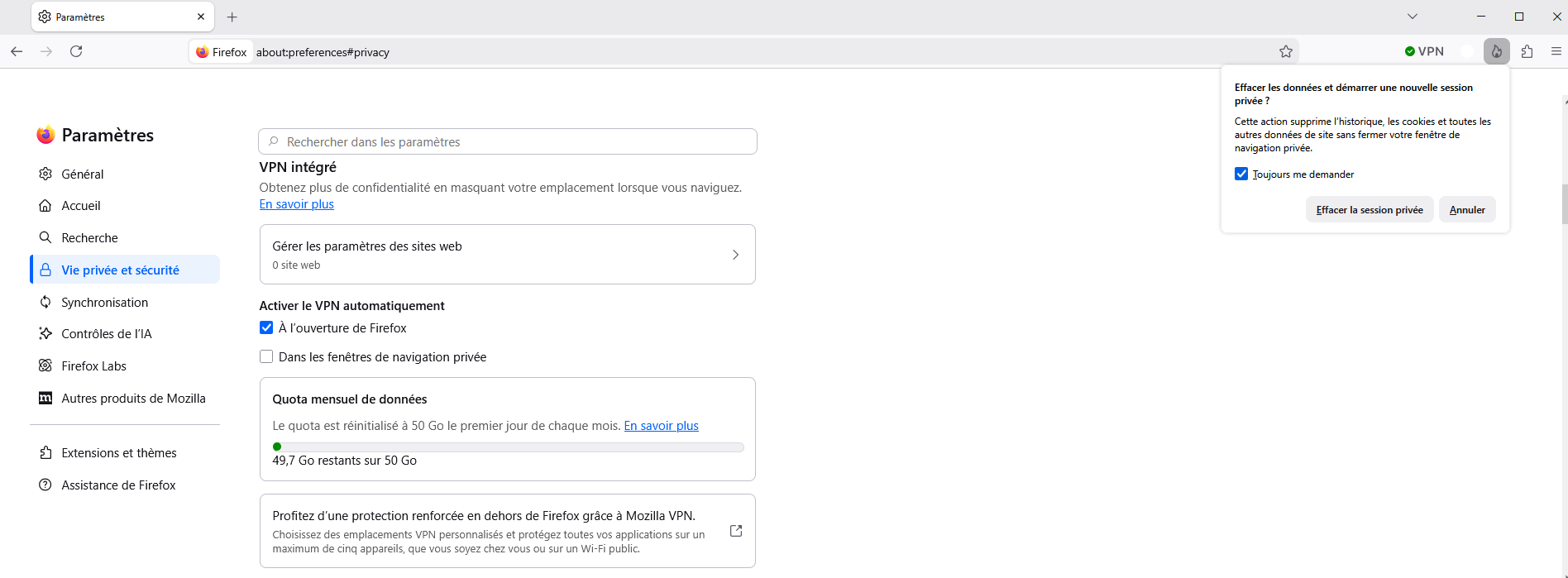
글쓴이 Agent virtuel 수정일시

A bit off topic from the specific question but still hopefully helpful to other people searching for this, so I will just put it here because I don't know where else: A summary of what I figured out about firefox's about:config configuration for the built-in vpn (in firefox version 151.0.3):
- browser.ipProtection.features.autoStart is the main toggle for the other preferences listed below
- browser.ipProtection.autoStartEnabled Setting this (and main toggle) to true results in vpn connecting at firefox startup.
- browser.ipProtection.autoStartPrivateEnabled Similar, just for private windows.
- browser.ipProtection.autoRestoreEnabled Seems to do nothing at the moment.
- browser.ipProtection.entitlementCache Seems to have no effect. Replacing the first entry "autostart":false with "autostart":true just gets reset to false after a restart if the main toggle is off.
If you manually turn on browser.ipProtection.features.autoStart in about:config, then options for autostart (i.e. normal toggles for 'browser.ipProtection.autoStartEnabled and 'browser.ipProtection.autoStartPrivateEnabled) become available in the normal firefox settings menu in the vpn section. I would like Mozilla to consider adding a toggle for browser.ipProtection.features.autoStart in the normal setting menu for easier access to this feature.
글쓴이 That Dude 수정일시
Hello
A space for users to give product feedback https://support.mozilla.org/en-US/kb/what-mozilla-connect
These similar discussions, https://connect.mozilla.org/t5/discussions/new-experiment-firefox-vpn-beta/m-p/128426#M51143, https://connect.mozilla.org/t5/ideas/firefox-vpn-automatic-start-setting-option/idi-p/128199