


Firefox freezes and is somerimes slow
While using JSPuzzles website it constantly freezes and is slow
선택된 해결법
Enhanced Tracking Protection is a collection of Firefox features that protects your privacy by blocking trackers that follow you online to collect information about your browsing habits and interests. It also includes protection against harmful scripts.
If a site seems broken, you can try turning off Enhanced Tracking Protection for that website:
- Click the shield
 icon at the left of the address bar.
- At the top of the panel, toggle off the Enhanced Tracking Protection switch
 . The site will be added to your Enhanced Tracking Protection exception list, allowing trackers on it, and the page will reload automatically.
-
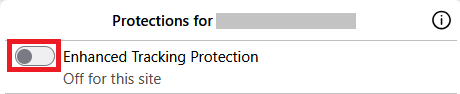
This will allow trackers to load on that website while keeping you protected on other sites. To learn more, see Enhanced Tracking Protection in Firefox for desktop.
문맥에 따라 이 답변을 읽어주세요 👍 0모든 댓글 (2)
선택된 해결법
Enhanced Tracking Protection is a collection of Firefox features that protects your privacy by blocking trackers that follow you online to collect information about your browsing habits and interests. It also includes protection against harmful scripts.
If a site seems broken, you can try turning off Enhanced Tracking Protection for that website:
- Click the shield icon at the left of the address bar.
- At the top of the panel, toggle off the Enhanced Tracking Protection switch . The site will be added to your Enhanced Tracking Protection exception list, allowing trackers on it, and the page will reload automatically.
-
This will allow trackers to load on that website while keeping you protected on other sites. To learn more, see Enhanced Tracking Protection in Firefox for desktop.
The issue turned out to be a pop up blocker I had as an extension. Removing it solved my issue.