


Windows 10 reached EOS (end of support) on October 14, 2025. If you are on Windows 10, see this article.

Mozilla 도움말 검색

고객 지원 사기를 피하세요. 저희는 여러분께 절대로 전화를 걸거나 문자를 보내거나 개인 정보를 공유하도록 요청하지 않습니다. "악용 사례 신고"옵션을 사용하여 의심스러운 활동을 신고해 주세요.

자세히 살펴보기

Tabs sharing over local network even though Sync is disabled

  • 답글 없음
  • 0 이 문제를 만남
  • 45 보기
  • Open

Hello, I have multiple devices using Firefox on the same network, and whenever using them at the same time, I get an additional Firefox icon in my doc which will open whatever tab is up on the other device. I was not signed in to any account on either device, yet it is still sharing tab data across devices.

I then created an account and signed in on one device and disabled every Sync option I could find, but still the sharing is enabled over local network. How do I disable this so there is no communication between the two devices?

Device 1 - MacBook Pro (Retina, 13-inch, Early 2015) macOS Monterey 12.7.6 Firefox Version 149.0.2

Device 2 - MacBook Pro 14-inch, 2023 macOS Sequoia 15.4.1 Firefox Version 149.0.2 Local Network access disabled for Firefox in macOS settings

It doesn't seem like this should even be possible given that local network access is disabled for the one device, and neither device is logged into a mozilla account.

Can someone please help me disable this functionality?
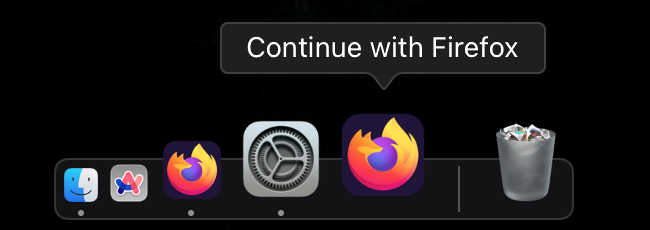
Hello, I have multiple devices using Firefox on the same network, and whenever using them at the same time, I get an additional Firefox icon in my doc which will open whatever tab is up on the other device. I was not signed in to any account on either device, yet it is still sharing tab data across devices. I then created an account and signed in on one device and disabled every Sync option I could find, but still the sharing is enabled over local network. How do I disable this so there is no communication between the two devices? Device 1 - MacBook Pro (Retina, 13-inch, Early 2015) macOS Monterey 12.7.6 Firefox Version 149.0.2 Device 2 - MacBook Pro 14-inch, 2023 macOS Sequoia 15.4.1 Firefox Version 149.0.2 Local Network access disabled for Firefox in macOS settings It doesn't seem like this should even be possible given that local network access is disabled for the one device, and neither device is logged into a mozilla account. Can someone please help me disable this functionality?
첨부된 스크린샷

글에 답글을 달기 위해서는 계정으로 로그인해야만 합니다. 계정이 아직 없다면 새로운 질문을 올려주세요.