


default browser

Hello Firefox Support Team,
Thank you for providing such an excellent browser, free of charge and without advertisements.
I am experiencing an issue on my Samsung J5 running Android 5. When I try to set Firefox as the default browser, I am redirected to an information page. While helpful, it does not mention that Firefox cannot be set as the default browser on Android versions below 8.
It would be clearer if this limitation were explicitly stated on that page.
Thank you for your attention, and best regards to the entire Firefox team.
모든 댓글 (3)
While helpful, it does not mention that Firefox cannot be set as the default browser on Android versions below 8.
It does not mention it, because Firefox can be set as default on Android 5, 6 and 7.
선택된 해결법
Step 1: Clear the current browser that opens links
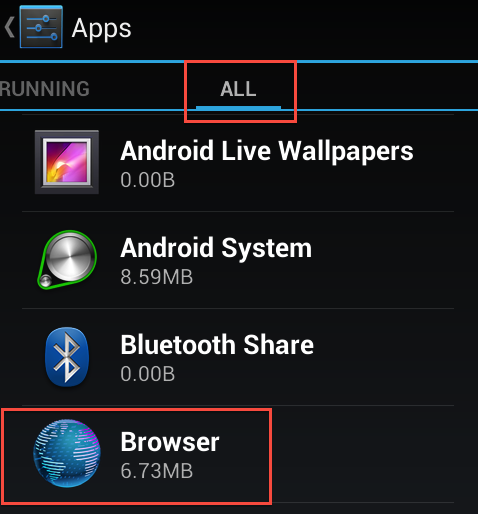
- Open the Settings application and tap on Apps. (On some versions of Android this button is labelled "Applications" and you may have to tap on Manage applications before the next step.)
- Tap on the All tab.
- Tap on the current browser that opens links. This is usually the default browser which is called "Browser" or "Internet".
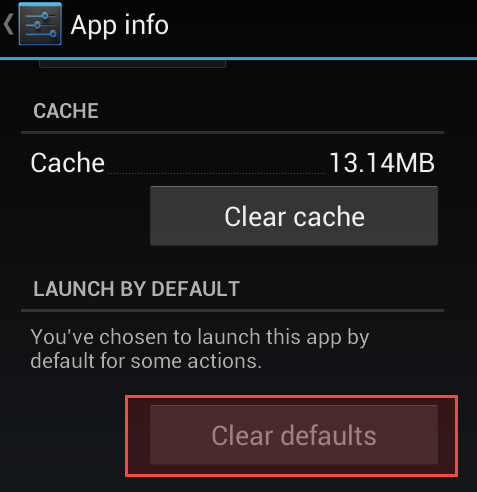
- Tap on Clear defaults to prevent this browser from opening links by default. If "Clear defaults" is greyed out, then either you have not installed another browser or you have installed another browser like Opera and it is set to be the default browser. If you have installed another browser, go back to the previous step and repeat with the default browser.
Step 2: Set Firefox to be the default browser for opening links
- Open a link in an Android application like the Mail application.
- Tap on Firefox and then tap on Always.

Thanks a lot. Your solution was helpful.