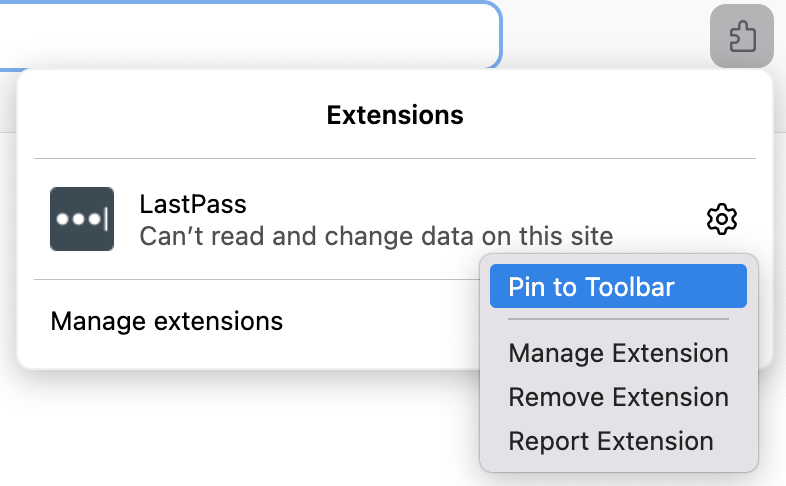
HOW TO ADD EXT TO THE RIBBON UP TOP
Anyone use LastPass? Do YOU have any hair left? How do I put that extension up at the top. Where my red arrow points? ALSO......
Im entering the email and password i swear dozens of times every day...it never works right, ALWAYS need one or both lines filled in. I DONT CARE IF IT DOESNT WANT ME TO SAVE THE PASSWORD. GOD KNOWS its NOT retaining it! OK, im 75 years old. HAVE I LOST MY MARBLES?
Anyone use LastPass? Do YOU have any hair left?
How do I put that extension up at the top. Where my red arrow points?
ALSO......
Im entering the email and password i swear dozens of times every day...it never works right, ALWAYS need one or both lines filled in. I DONT CARE IF IT DOESNT WANT ME TO SAVE THE PASSWORD. GOD KNOWS its NOT retaining it! OK, im 75 years old. HAVE I LOST MY MARBLES?
선택된 해결법
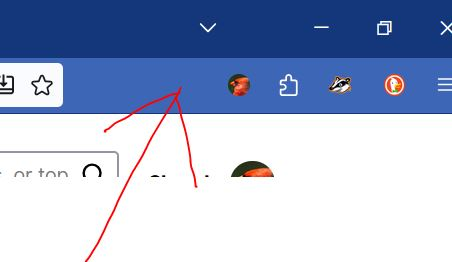
Open the extension panel on the toolbar, click on the Settings icon for LastPass, select Pin to Toolbar.
문맥에 따라 이 답변을 읽어주세요 👍 0모든 댓글 (4)

선택된 해결법
Open the extension panel on the toolbar, click on the Settings icon for LastPass, select Pin to Toolbar.
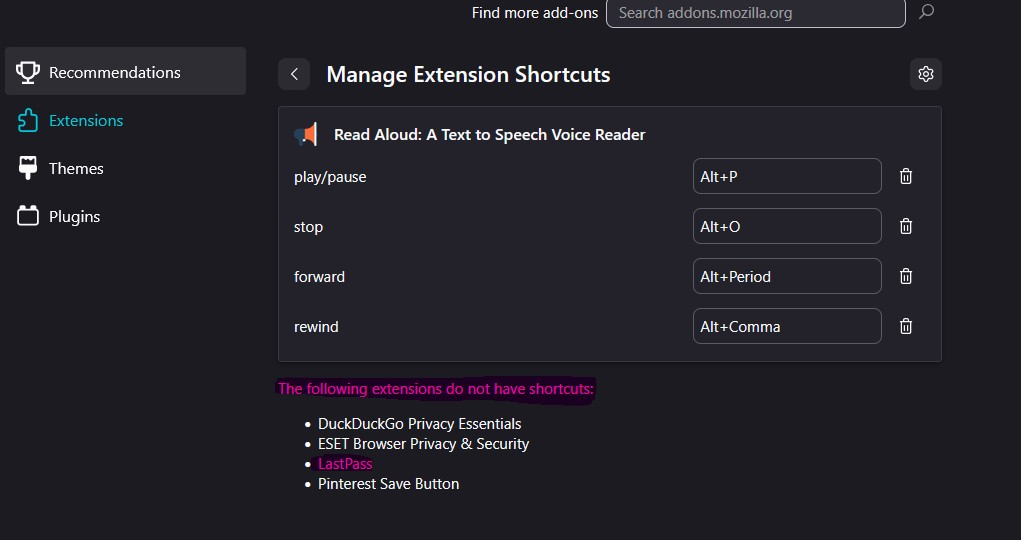
Christina, the extension shortcuts are unrelated to pinning extensions on the toolbar. View the screenshot below:
Additionally, please create a separate thread when you have a question.