


Message filters do not run.

I set up message filters to run automatically on my inbox as the messages come in. They don't work. I've searched all kinds of solutions, read and tried the solutions posted here, followed the steps...they don't run. What am I missing?
모든 댓글 (6)

Would you please share a screenshot of your filter rules?
Hi Wayne, Rick,
I have deleted all rules to clean the slate/start fresh. Setting it up is taking more time than I have at present so I've shelved it for now & kept my old client. I will come back to it when I have the time to commit to it.
Nicole

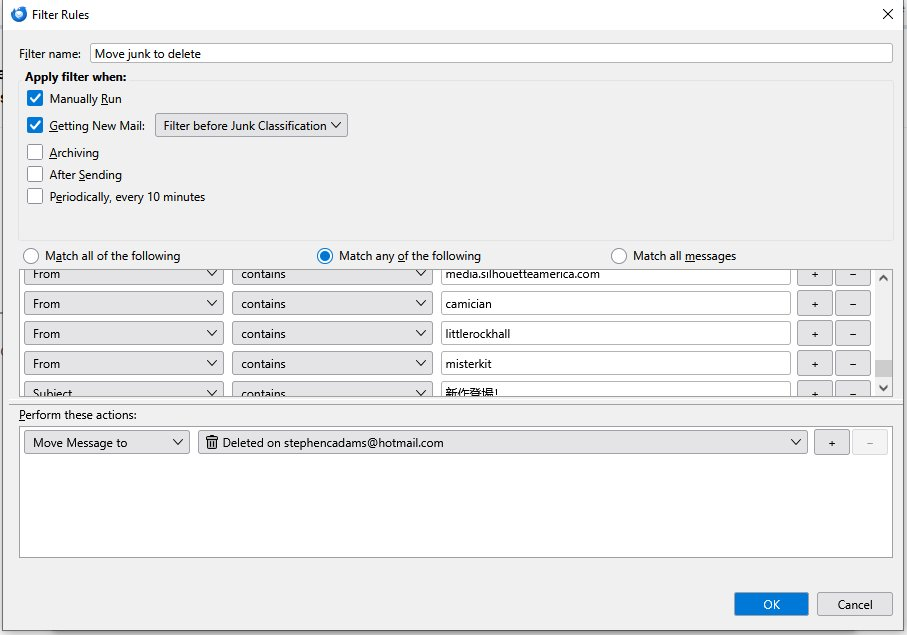
My message filter is setup to send junk email to the deletion folder. But some still get through and are put in the junk folder. Running the same filter manually clears out the junk folder, proving the filter works! But it does not clear them out before they get into inbox, or junk folder as it should do. Flags are set to do this as per information on thunderbird. Please could this be fixed?
Hi Stephen,
It's not clear yet that there is something to be fixed. In any case, no one in this support community of users can fix software errors. Let's see if Thunderbird is actually operating normally.
On which folder does this filter run? Inbox or junk? Or do you have filters on both folders?
One possible explanation is that the server is putting messages into the junk folder before your filter runs.
(In general, the server is the better place for junk filtering, especially if you access your mail from more than one client. I reject some junk at the server so it never even appears in an inbox, a spam folder, or trash and I never have to deal with it. Other junk I have sent straight to the trash. Because these actions occur at the server, they keep junk out of all my e-mail clients.)
If the filter is running on your inbox and the server is putting messages into the junk folder, then the messages will be in the junk folder before your filter runs and the filter would not operate on them.
If the filter is running on your junk folder, then it might not get triggered when new mail arrives (I am not sure about the logic here), but would work when run manually.
Have you checked your settings in account settings > spam (or junk) settings? Have you enabled junk filtering in Thunderbird? Are you trusting headers from a filter that the server uses? Are you filing new spam/junk automatically into the deleted folder?
To get more responses from people on this forum, you should create a new discussion. I may be the only person who sees your post because I responded to the original poster. I do not know everything there is to know about filters in Thunderbird.
If there really is a bug, you can report it here: https://bugzilla.mozilla.org/home
But I doubt that there is one.
Also, best please to create a new question rather than post in someone else's question.