


Windows 10 reached EOS (end of support) on October 14, 2025. If you are on Windows 10, see this article.

Mozilla 도움말 검색

고객 지원 사기를 피하세요. 저희는 여러분께 절대로 전화를 걸거나 문자를 보내거나 개인 정보를 공유하도록 요청하지 않습니다. "악용 사례 신고"옵션을 사용하여 의심스러운 활동을 신고해 주세요.

자세히 살펴보기
보존

Thunderbird 139.0.2 for Mac doesn’t highlight words as it spell checks. (bug1971121)

designer5

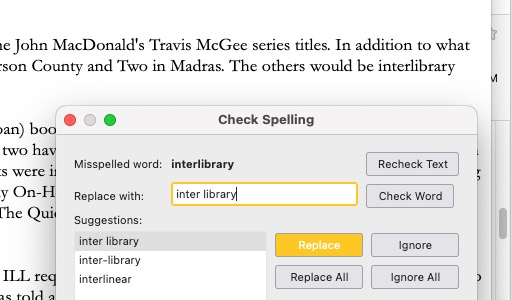
In the past, as Thunderbird was spell checking (triggered by pushing Send), it would highlight the words it questioned. For the last few weeks, maybe longer, it still spell checks, but the words it stops at are no longer highlighted. So I don’t know where in the body of the email the issue occurs. Without seeing the context around the potential misspelled word, I can’t tell if I should accept the suggested correction, or push Ignore.

I’ve attached a screen shot of Thunderbird stopping at “interlibrary” but there is no indication at that word in the body of the email.

When I tried a simpler example - one sentence with a misspelling - the misspelling was given a red underline. And occasionally, a questioned word would be highlighted. But it use to work reliably ALL the time.

What can I do to bring back highlighting the questionable word? I didn’t realize how much more useful it made the spell checking.
In the past, as Thunderbird was spell checking (triggered by pushing Send), it would highlight the words it questioned. For the last few weeks, maybe longer, it still spell checks, but the words it stops at are no longer highlighted. So I don’t know where in the body of the email the issue occurs. Without seeing the context around the potential misspelled word, I can’t tell if I should accept the suggested correction, or push Ignore. I’ve attached a screen shot of Thunderbird stopping at “interlibrary” but there is no indication at that word in the body of the email. When I tried a simpler example - one sentence with a misspelling - the misspelling was given a red underline. And occasionally, a questioned word would be highlighted. But it use to work reliably ALL the time. What can I do to bring back highlighting the questionable word? I didn’t realize how much more useful it made the spell checking.
첨부된 스크린샷

글쓴이 Wayne Mery 수정일시

모든 댓글 (1)

There is nothing you can do. This is a known bug 1971121, still to be fixed.