

이 쓰레드는 보존되었습니다.
만약 도움이 필요하시면 새로운 질문을 올려주세요.

해결됨
보존
Bookmark icons are generic and colorless on Windows 11

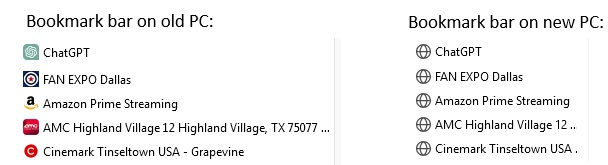
I just upgraded from an older computer OS to Windows 11. I imported my bookmarks but really hate the new look of the bookmarks bar in Win11. The icons are all generic and have no color. I've attached a screen shot illustrating.
I just upgraded from an older computer OS to Windows 11. I imported my bookmarks but really hate the new look of the bookmarks bar in Win11. The icons are all generic and have no color. I've attached a screen shot illustrating.
모든 댓글 (2)
선택된 해결법
Did you try to visit each bookmark to make Firefox retrieve the favicon from the website?
Well, I'm embarrassed. I had tried that with the first bookmark (ChatGPT) and it didn't change. But I tried it with some of the others (per your cor-el's recommendation) and it worked.