


Windows 10 reached EOS (end of support) on October 14, 2025. If you are on Windows 10, see this article.

Mozilla 도움말 검색

고객 지원 사기를 피하세요. 저희는 여러분께 절대로 전화를 걸거나 문자를 보내거나 개인 정보를 공유하도록 요청하지 않습니다. "악용 사례 신고"옵션을 사용하여 의심스러운 활동을 신고해 주세요.

자세히 살펴보기
보존

Toolbars

markwarner22 replied
hjohnmcguigan

Windows 10, current with latest update. My release of Firefox, after all latest updates, does not show/list any TOOLBARS on the left side of the page. They are gone. I can't find anyway to get that list back. Import from MS/EDGE does not work. I see some TOOL Icons across the top of the page, I repeat............. SOME Tool Icons, not many. Tried to query for help in Mozilla posing that same question. ZILCH of any helpful reply. this is what is answered.......................

To list the toolbars in Firefox, you can: 1. Click the menu button • • Click More tools • • Select Customize toolbar • • Click the Toolbars dropdown menu at the bottom of the screen • • Choose the toolbars you want to display • • Click Done

To display your bookmarks in Firefox, you can use the Bookmarks Toolbar, the Firefox Sidebar, or the Menu bar Bookmarks menu: • Bookmarks Toolbar You can show or hide the Bookmarks Toolbar using the View menu, the keyboard shortcut Ctrl + Shift + B, or by right-clicking on the Tab bar: 1. Click the View menu at the top of the screen • • Go down to Toolbars • • Select Bookmarks Toolbar • • Choose from the following settings: • Always Show: Shows the toolbar on all pages • • Never Show: Hides the toolbar on all pages • • Only Show on New Tab: Shows the toolbar only on the New Tab page 1. • o • Firefox Sidebar You can toggle the Sidebar on and off by clicking the Sidebar button and selecting the option you want to load. • • Menu bar Bookmarks menu You can access your bookmarks from the Menu bar Bookmarks menu if the Menu bar is enabled. To show the Menu bar, you can: 1. Click the menu button • • Click More Tools • • Choose Customize Toolbar • • Click Toolbars at the bottom of the window • • Click Menu Bar • • Click Done to save your changes


Nothing works. There is an attached screen image of the Mozilla Browser Page I see. Thanks for listening.
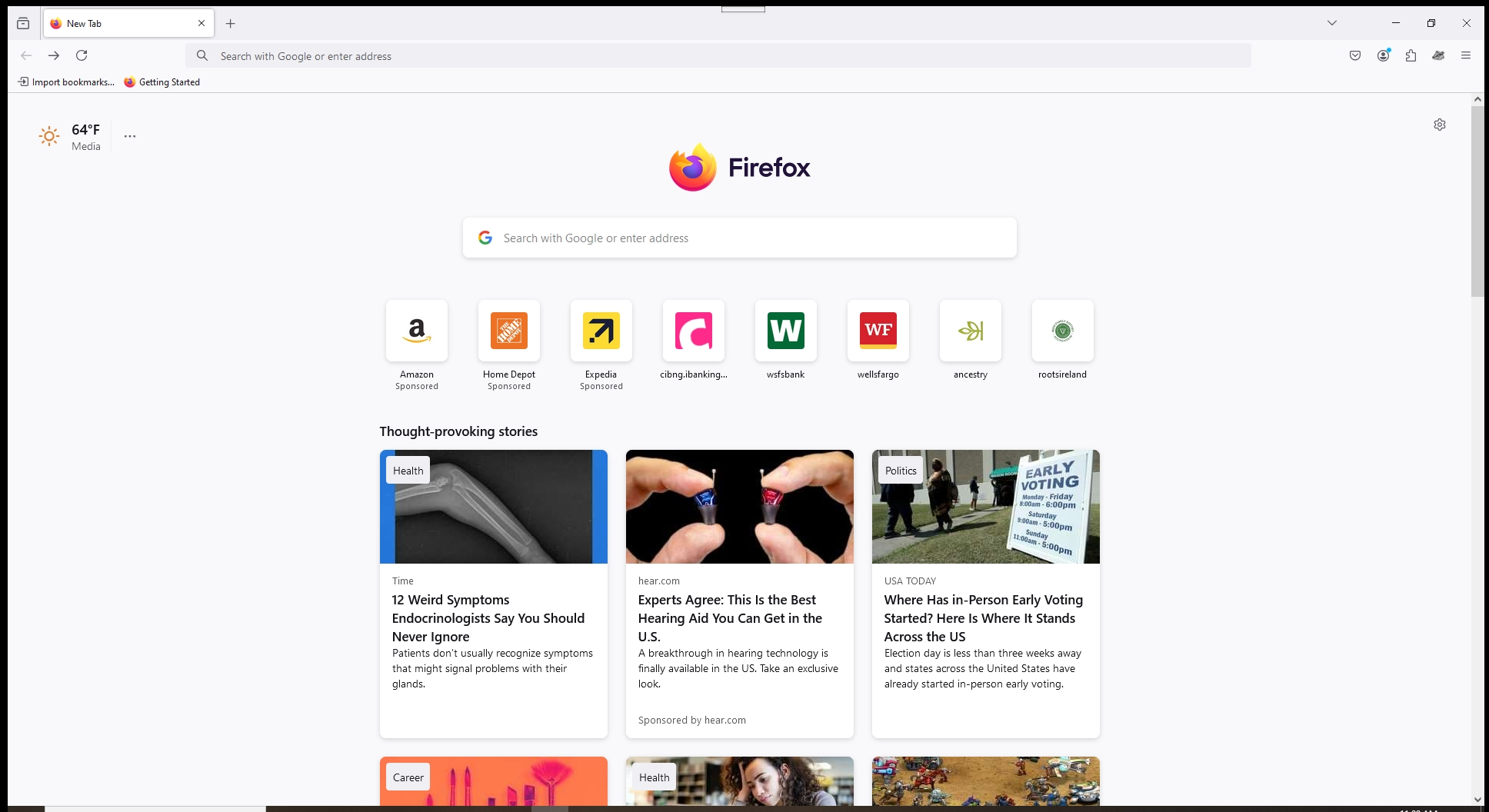
Windows 10, current with latest update. My release of Firefox, after all latest updates, does not show/list any TOOLBARS on the left side of the page. They are gone. I can't find anyway to get that list back. Import from MS/EDGE does not work. I see some TOOL Icons across the top of the page, I repeat............. SOME Tool Icons, not many. Tried to query for help in Mozilla posing that same question. ZILCH of any helpful reply. this is what is answered....................... To list the toolbars in Firefox, you can: 1. Click the menu button • • Click More tools • • Select Customize toolbar • • Click the Toolbars dropdown menu at the bottom of the screen • • Choose the toolbars you want to display • • Click Done To display your bookmarks in Firefox, you can use the Bookmarks Toolbar, the Firefox Sidebar, or the Menu bar Bookmarks menu: • Bookmarks Toolbar You can show or hide the Bookmarks Toolbar using the View menu, the keyboard shortcut Ctrl + Shift + B, or by right-clicking on the Tab bar: 1. Click the View menu at the top of the screen • • Go down to Toolbars • • Select Bookmarks Toolbar • • Choose from the following settings: • Always Show: Shows the toolbar on all pages • • Never Show: Hides the toolbar on all pages • • Only Show on New Tab: Shows the toolbar only on the New Tab page 1. • o • Firefox Sidebar You can toggle the Sidebar on and off by clicking the Sidebar button and selecting the option you want to load. • • Menu bar Bookmarks menu You can access your bookmarks from the Menu bar Bookmarks menu if the Menu bar is enabled. To show the Menu bar, you can: 1. Click the menu button • • Click More Tools • • Choose Customize Toolbar • • Click Toolbars at the bottom of the window • • Click Menu Bar • • Click Done to save your changes Nothing works. There is an attached screen image of the Mozilla Browser Page I see. Thanks for listening.
첨부된 스크린샷

모든 댓글 (1)