

이 쓰레드는 보존되었습니다.
만약 도움이 필요하시면 새로운 질문을 올려주세요.

보존
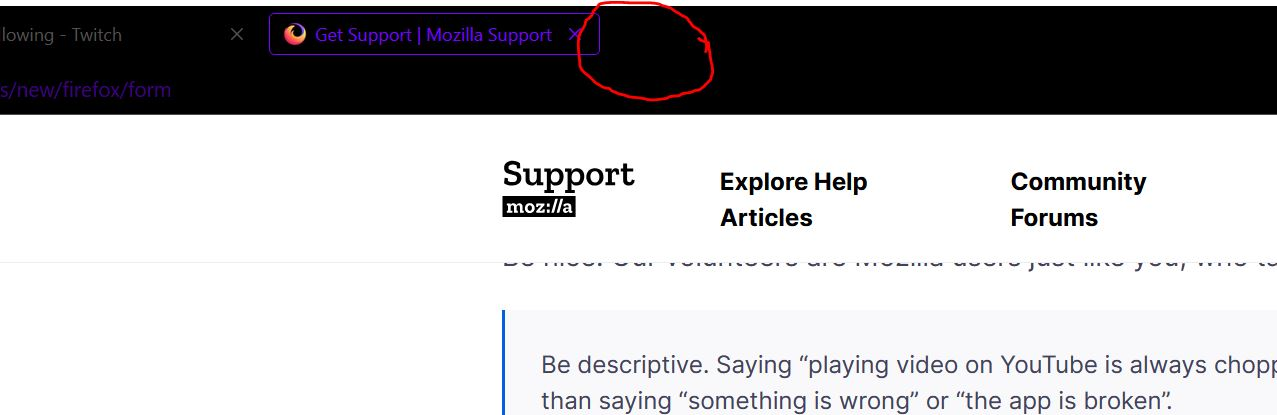
New tab button missing 133.0a1 (2024-10-04) (64-bit)

I am currently on 133.0a1 (2024-10-04) (64-bit) Nightly and the new tab button to the right of the tabs is missing. It will show up sometimes, but I have to go to customize and move some things around, then start browsing and it will pop back up.
I use that button often, how do I get that back?
I am currently on 133.0a1 (2024-10-04) (64-bit) Nightly and the new tab button to the right of the tabs is missing. It will show up sometimes, but I have to go to customize and move some things around, then start browsing and it will pop back up.
I use that button often, how do I get that back?
모든 댓글 (1)
Try Restore Defaults on the Customize page.
Start Firefox in Troubleshoot Mode to check if one of the extensions ("3-bar" menu button or Tools -> Add-ons -> Extensions) or if hardware acceleration or if userChrome.css/userContent.css is causing the problem.
- switch to the Default System theme: "3-bar" menu button or Tools -> Add-ons -> Themes
- do NOT click "Refresh Firefox" in the Troubleshoot Mode start window