


Firefox will not open on first attempt.

I run the latest version of Firefox.
Lately it refuses to open on first attempt - be it from a start menu link or double-clicking the shortcut on my desktop or trying to open a html file directly.
It's annoying and i'd like to fix it.
I've done all the usual stuff like clearing the cache.
tia.
선택된 해결법
NoahSUMO said
Hey jonzn4SUSE, It looks like Crypt is using Firefox 125 on Win 10 64-bit according to his useragent. User Agent: Mozilla/5.0 (Windows NT 10.0; Win64; x64; rv:125.0) Gecko/20100101 Firefox/125.0 Crypt, I know this is separate from your issue but is there any reason you don't want to upgrade to Firefox 130? Back to the main issue of Firefox not starting up on the first try, it might be due to one of your addons or plugins interfering with Firefox's startup. You can try disabling all its addons then quitting Firefox and keep reopening it to see if its more consistent in opening up now. To disable all addons: Disable or remove Add-ons You also need to check the Plugins section as well. Over the years there have been many plugins known to crash Firefox at startup or cause other weird startup issues.
For some reason FF got stuck updating. I downloaded v30 and installed and it all seems ok now.
thank you NoahSUMO for nudging me in the right direction.
문맥에 따라 이 답변을 읽어주세요 👍 1모든 댓글 (5)
""" I've done all the usual stuff like clearing the cache. """
Mmmm. not helping.
What version of Firefox? What OS? If Linux, what Desktop and X11 or Wayland? Look at the properties of the shortcut on desktop. see screenshot
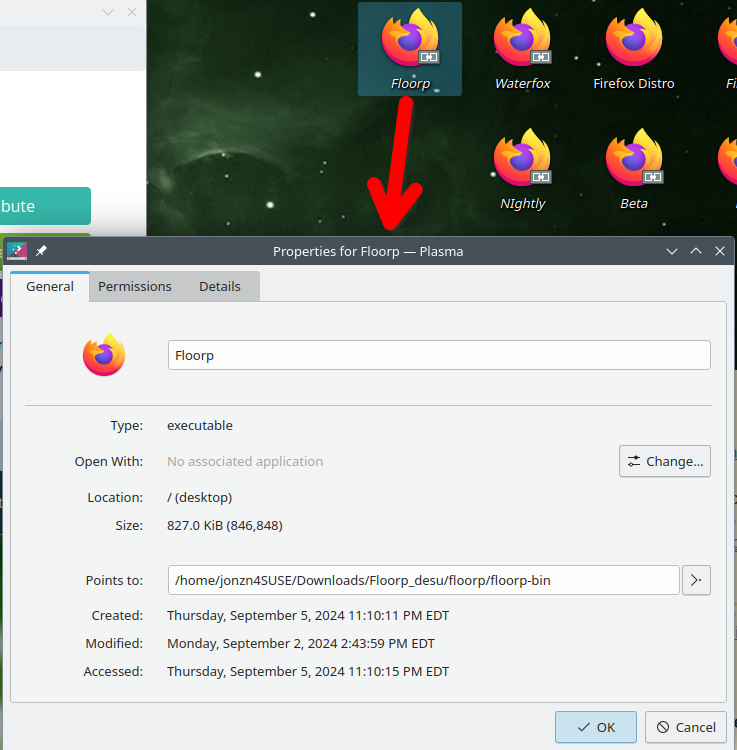
글쓴이 jonzn4SUSE 수정일시
Hey jonzn4SUSE, It looks like Crypt is using Firefox 125 on Win 10 64-bit according to his useragent. User Agent: Mozilla/5.0 (Windows NT 10.0; Win64; x64; rv:125.0) Gecko/20100101 Firefox/125.0
Crypt, I know this is separate from your issue but is there any reason you don't want to upgrade to Firefox 130?
Back to the main issue of Firefox not starting up on the first try, it might be due to one of your addons or plugins interfering with Firefox's startup. You can try disabling all its addons then quitting Firefox and keep reopening it to see if its more consistent in opening up now.
To disable all addons: Disable or remove Add-ons
You also need to check the Plugins section as well. Over the years there have been many plugins known to crash Firefox at startup or cause other weird startup issues.
선택된 해결법
NoahSUMO said
Hey jonzn4SUSE, It looks like Crypt is using Firefox 125 on Win 10 64-bit according to his useragent. User Agent: Mozilla/5.0 (Windows NT 10.0; Win64; x64; rv:125.0) Gecko/20100101 Firefox/125.0 Crypt, I know this is separate from your issue but is there any reason you don't want to upgrade to Firefox 130? Back to the main issue of Firefox not starting up on the first try, it might be due to one of your addons or plugins interfering with Firefox's startup. You can try disabling all its addons then quitting Firefox and keep reopening it to see if its more consistent in opening up now. To disable all addons: Disable or remove Add-ons You also need to check the Plugins section as well. Over the years there have been many plugins known to crash Firefox at startup or cause other weird startup issues.
For some reason FF got stuck updating. I downloaded v30 and installed and it all seems ok now.
thank you NoahSUMO for nudging me in the right direction.
You're welcome! Major thanks for coming back to tell us what solved the problem. Many times we never find out what helped fix the problem. :)
글쓴이 NoahSUMO 수정일시