


How to correct a problem with message filter.

Hi there
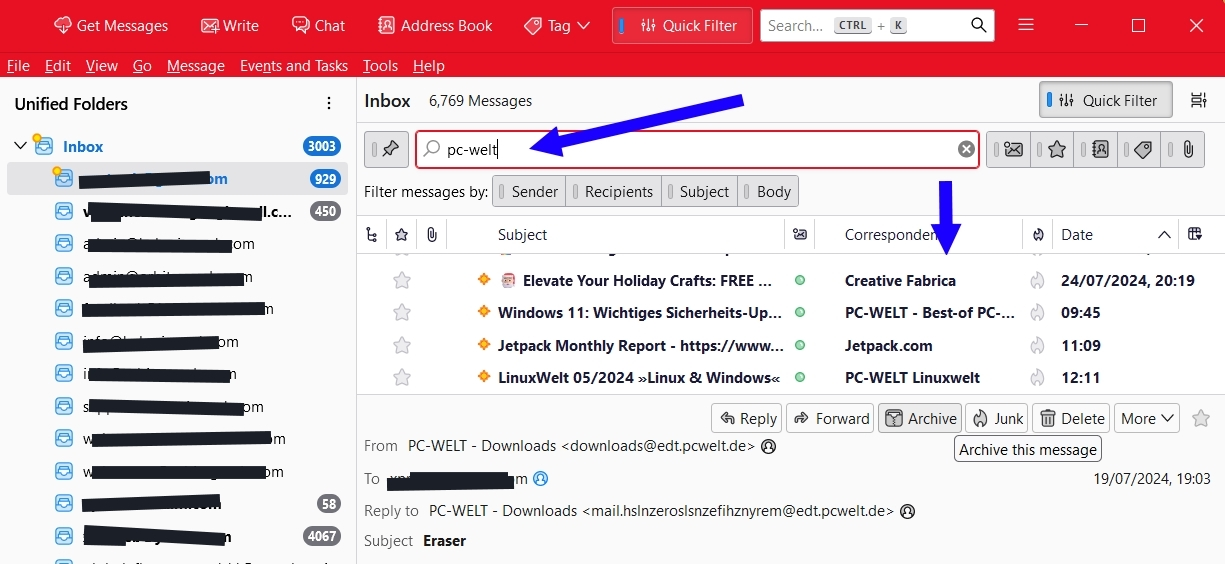
I have a probably easy to solve issue that has been causing a lot of headaches of late. Previously, as seen in the screenshot, if I wanted to filter out messages say from "PC-welt" or contained that term, I just needed to type that term in the searchbox shown and immediately all messages with it would automatically be sorted out, without even hitting the search button. One can for example then do a bulk deletion. That screenshot would be showing a list of messages with "pc-welt", say in the senders info or subject.
For some reason I yet do not know, this has ceased happening and in fact as shown, nothing happens at all, even after hitting the search button. Why is this and how can I come back to THIS function? If one uses the "Quich filter", which I DO NOT LIKE, the results are opened in a new tab and not in a form like the preferred option. I do not remember making any Thunderbird filter settings and if I did then unintended. How can I get back to the function of just typing a term, with all results being immediately filtered within that window so I can for example select and delete them?
I have the latest version 115.13.0 (64-bit) (portable)
Thank you in advance.
모든 댓글 (1)
Update Solution found, after selecting under "Filter message by:" "Sender" or other! This had been for some reason unselected which led to the issue.