


Mobile bookmarks folder dissapeared on PC

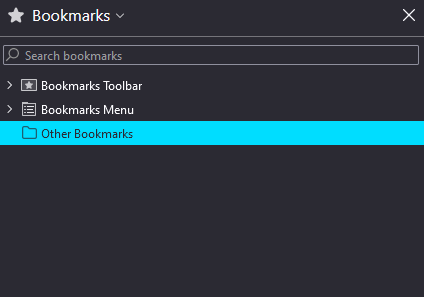
There used to be 4 root folders in my bookmarks toolbar on PC: bookmarks toolbar, bookmarks menu, other bookmarks and mobile bookmarks. Recently I noticed the "mobile bookmarks" folder is gone. That is where bookmarks saved in the default folder on mobile were synced. What happened?
선택된 해결법
I don't know what happened but it ended up re-appearing so I guess it was just a sync issue. Thanks for taking the time.
문맥에 따라 이 답변을 읽어주세요 👍 0모든 댓글 (2)
You can install the About Sync extension to check what data is stored on the Sync server via the about:sync page provided by this extension.
Close and restart Firefox to access the about:sync page added by this extension (see the about:about page for possible about pages).
You can open about:sync-log via the location bar to see if recent Sync error logs are available. You can upload the file to a website like Pastesite if you can't post the content of the file in a reply.
선택된 해결법
I don't know what happened but it ended up re-appearing so I guess it was just a sync issue. Thanks for taking the time.