

이 쓰레드는 보존되었습니다.
만약 도움이 필요하시면 새로운 질문을 올려주세요.

보존
Disable bottom-right corner scroll down button when in full screen

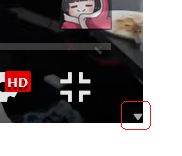
When watching Youtube in full screen, mousing over bottom right corner of the screen activates some kind of a miniscule scroll down button. I assume this is an issue with Firefox since it does not occur in other browsers. I want to disable this functionality so when instinctively navigating to the bottom right corner I disable full screen, not scroll down.
When watching Youtube in full screen, mousing over bottom right corner of the screen activates some kind of a miniscule scroll down button. I assume this is an issue with Firefox since it does not occur in other browsers. I want to disable this functionality so when instinctively navigating to the bottom right corner I disable full screen, not scroll down.
모든 댓글 (1)
You can hide the scrollbar in fullscreen youtube by installing uBlock Origin and adding the following line to "My filters":
youtube.com##ytd-app:style(scrollbar-width: none !important;)