


Profile Manager Theme Suddenly Turns Into Light

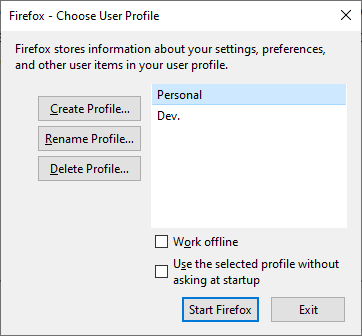
Firefox's Profile Manager has always been in dark theme, which makes sense as my Windows theme preferences dictate that. However, once, I launched Firefox, which, as per preferences, asks which profile to use (i.e. Profile Manager), and the window is in light theme! I tried refreshing Firefox, and when that didn't work uninstalling Firefox along with user data and preferences (along with the "Old Firefox Data" folder on Desktop), but none of that made a difference. I restarted the computer, and that didn't nudge a thing either. What is happening?
선택된 해결법
Can you do that for me? You probably are going to get noticed more easily than me.
문맥에 따라 이 답변을 읽어주세요 👍 0모든 댓글 (6)
Hmm, that's interesting. In Firefox 96, many more built-in pages/dialogs are themed according to your toolbar theme:
- dark text on tabs => Light theme
- light text on tabs => Dark theme
Do you use a Light theme for your toolbar?
Sorry, what do you mean by the toolbar?
This may be easier to explain with a picture.

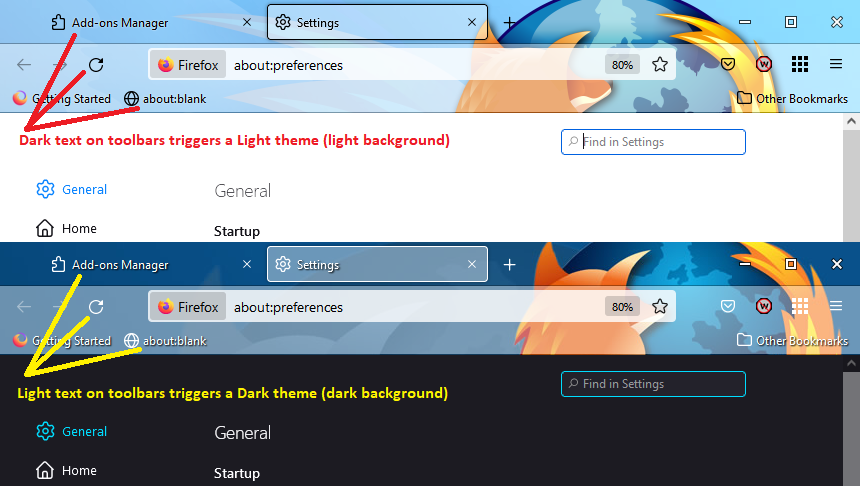
Text and controls are actually light there. See the attachments.

Hmm, I don't know then. Firefox must be getting that color scheme from some other source for the "external" profile manager. Which I guess makes some sense because it hasn't loaded a profile yet.
You could file a bug if no one else has done so already: https://bugzilla.mozilla.org/
선택된 해결법
Can you do that for me? You probably are going to get noticed more easily than me.