


The ProctorU extension has hacked Firefox and is not visible in the list extensions - How can I get rid of it?

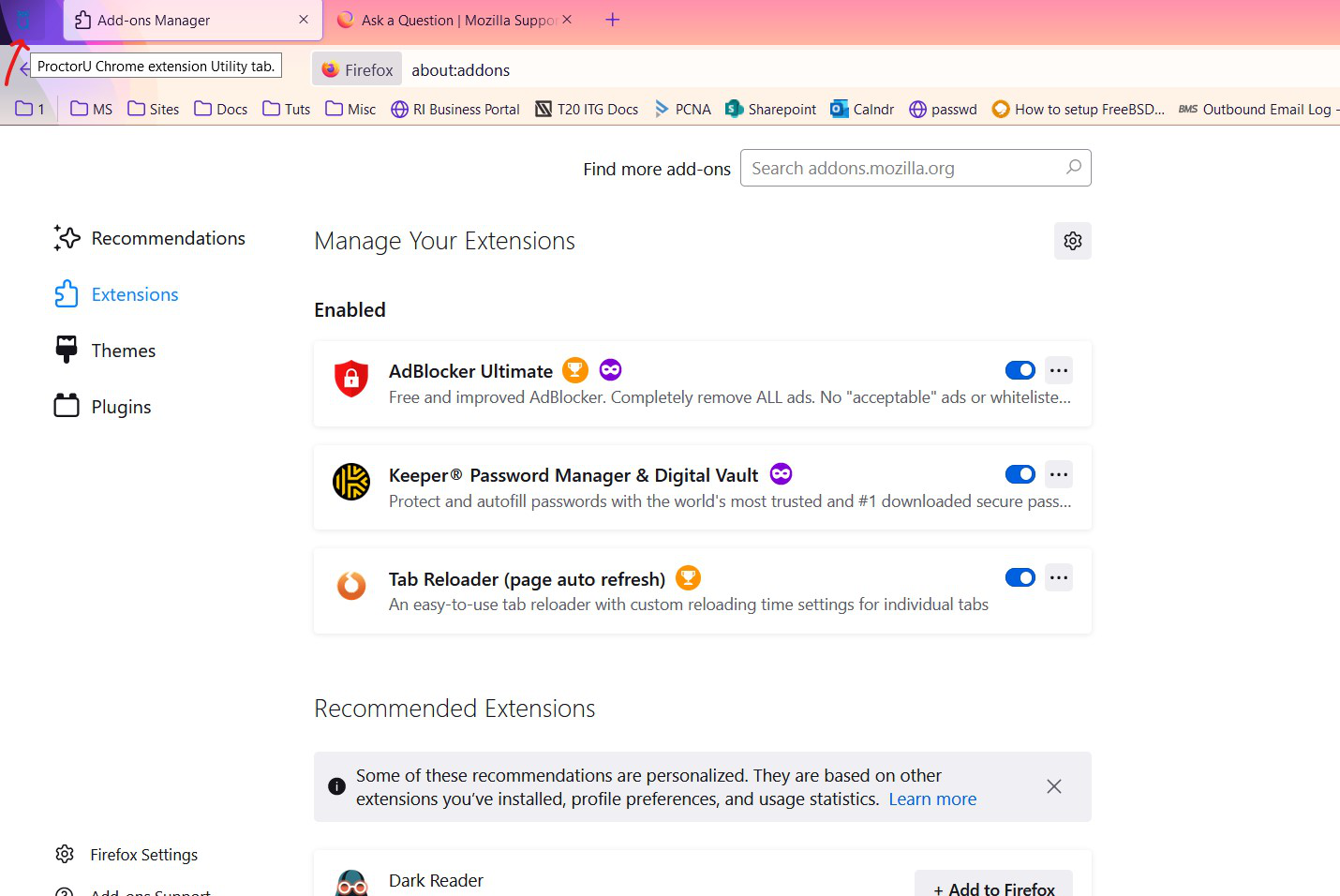
I used the ProctorU extension to complete a PCNA exam. But it is still in my browser (image of an owl in the top left corner) This is very alarming to me, as it is not visible in the "Manage Your Extensions" list, and also very annoying because I don't have any way to get rid of it. What is going on here? Is Firefox secure? How does this thing have hooks into my browser and how do I get rid of it?
선택된 해결법
Thank you for the screenshot. I wonder whether that is a pinned tab -- a tab that automatically reopens each session and is styled without a title. If you right-click the owl, does the context menu list Unpin Tab? And does the menu also have Close Tab?
Edit:
For reference, this is the article on pinned tabs: Pinned Tabs - keep favorite websites open and just a click away.
문맥에 따라 이 답변을 읽어주세요 👍 1모든 댓글 (5)

I would try downloading Advanced Uninstaller 13 PRO its trustful i use it myself and deinstalling Firefox with that. It scans everithing for hacked files from Firefox and deletes them. Even Registry. Then i would try starting Computer new and installing Firefox again.
Kindly, Firefox-User PS:Firefox is not 100% proof secure can be hacked trough Add-Ons so i would recommend alarming Firefox to this extension + User. If this doesnt work i would set up Computer new and copy the useful files to flash drive.
글쓴이 Christian 수정일시
You can start Firefox in Troubleshoot Mode to see whether this makes the extension appear.
Start Firefox in Troubleshoot Mode to check if one of the extensions ("3-bar" menu button or Tools -> Add-ons -> Extensions) or if hardware acceleration or userChrome.css is causing the problem.
- switch to the DEFAULT theme: "3-bar" menu button or Tools -> Add-ons -> Themes
- do NOT click the "Refresh Firefox" button on the Troubleshoot Mode start window
선택된 해결법
Thank you for the screenshot. I wonder whether that is a pinned tab -- a tab that automatically reopens each session and is styled without a title. If you right-click the owl, does the context menu list Unpin Tab? And does the menu also have Close Tab?
Edit:
For reference, this is the article on pinned tabs: Pinned Tabs - keep favorite websites open and just a click away.
글쓴이 jscher2000 - Support Volunteer 수정일시
jscher2000 said
Thank you for the screenshot. I wonder whether that is a pinned tab -- a tab that automatically reopens each session and is styled without a title. If you right-click the owl, does the context menu list Unpin Tab? And does the menu also have Close Tab? Edit: For reference, this is the article on pinned tabs: Pinned Tabs - keep favorite websites open and just a click away.
It was a pinned tab! I have never pinned a tab before and didn't realize this functionality existed. Not only did this solve my problem, but I learned a cool new trick that I can definitely use! Thank you
Good to hear. Extensions can pin tabs, so it probably pinned the tab for you and didn't unpin it when finished.