


Firefox extends its vertical size each time it is started

This glitch happens since I've started using Firefox several years ago: every time I start Firefox it extends its vertical size by adding some pixels to its top and bottom.
How can I stop it? Restore xulstore.json each time I want to restore the FF window size doesn't look like a good idea.
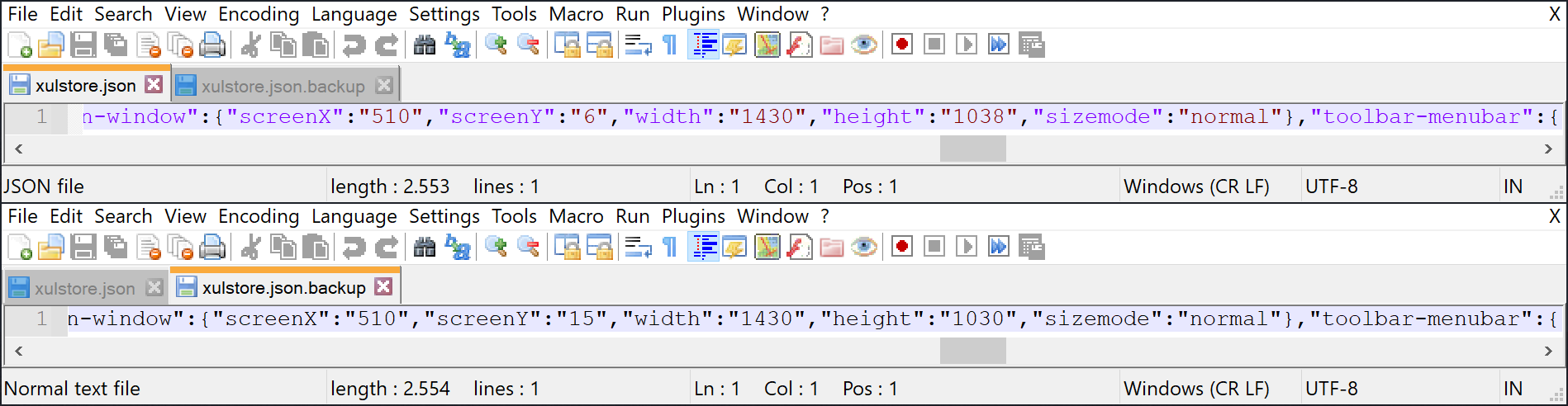
Attached are screenshots of xulstore.json (colored is the current and black is the backup ones) to show the glitch clearly.
I'm currently using Windows 10 Pro.
모든 댓글 (6)

https://support.mozilla.org/en-US/kb/changes-toolbars-and-window-sizes-are-not-saved You may have corrupt xulstore.json file.
Close Firefox. Open your file browser to this hidden location:
- Mac: *~/Library/Application Support/Firefox/Profiles
- Linux: *~/.mozilla/firefox/Profiles
- Windows: %AppData%\Mozilla\Firefox\Profiles
- *C:\Users\<user>\AppData\Roaming\Mozilla\Firefox\Profiles
- Windows XP: C:\Documents and Settings\<user>\Application Data \Mozilla\Firefox\Profiles\
Search for the above file. Then rename or delete it. Restart Firefox.
글쓴이 kacharava.yuri 수정일시
FredMcD said
You may have corrupt xulstore.json file.
No, I may not. Deleted this file several times, recreated it by Firefox. Still increases its window's vertical size.
Use these links to create a new profile. Use this new profile as is. Is the problem still there?
https://support.mozilla.org/en-US/kb/how-run-firefox-when-profile-missing-inaccessible
http://kb.mozillazine.org/Profile_folder_-_Firefox#Navigating_to_the_profile_folder
https://support.mozilla.org/en-US/kb/profile-manager-create-and-remove-firefox-profiles
https://support.mozilla.org/en-US/kb/back-and-restore-information-firefox-profiles
Type about:profiles<enter> in the address bar.
FredMcD said
Use these links to create a new profile. Use this new profile as is. Is the problem still there?
Yes, it is.
I called for more help.