


Need Speech to Text Capability in Firefox for iOS
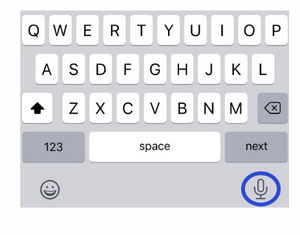
Firefox is my default browser on iPhone 11 Pro. I use an education app that has a Speech to Text feature to dictate student observations. In a Safari browser this feature is readily accessed by a microphone symbol on the keyboard that comes up in a text window. In Firefox I cannot access the microphone for speech to text. I don't want to go back to Safari as my default browser. Is there a workaround? The image is of the Safari screen in this app. Can Firefox enable a similar access using an icon for the microphone?
Firefox is my default browser on iPhone 11 Pro. I use an education app that has a Speech to Text feature to dictate student observations. In a Safari browser this feature is readily accessed by a microphone symbol on the keyboard that comes up in a text window. In Firefox I cannot access the microphone for speech to text. I don't want to go back to Safari as my default browser. Is there a workaround? The image is of the Safari screen in this app. Can Firefox enable a similar access using an icon for the microphone?
선택된 해결법
Check keyboard settings in Settings app. Speech to text option should be beside space button.
문맥에 따라 이 답변을 읽어주세요 👍 0모든 댓글 (1)
선택된 해결법
Check keyboard settings in Settings app. Speech to text option should be beside space button.