


Corrupted Outgoing Server (SMTP) Settings when opening Thunderbird
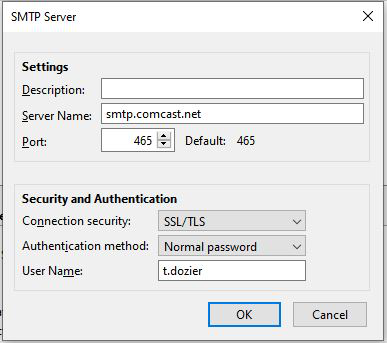
I have 1 email account on Thunderbird. I set my Outgoing Server (SMTP) settings to - Connection security: SSL/TLS - Authentication methods: Normal password
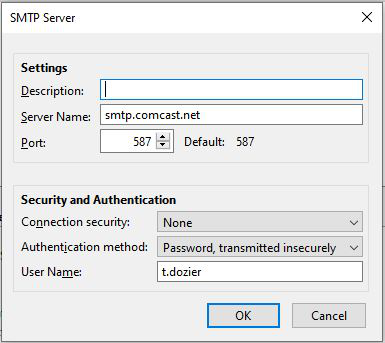
I exit Thunderbird, then open Thunderbird. When I check my Outgoinig Server settings, I get the following: - Connection security: None - Authentication method: Password, transmitted insecurely
I can received emails, but cannot send.
I manually change the Outgoing Server settings to SSL/TLS (and it changes Authentication to Normal Password), and then I can send emails.
This problem developed when I had my profile in Dropbox, and alternated between 2 computers. It started on one computer only, then developed on the 2nd computer. I have since purchased a new computer and transfered my profile to the hard drive on the new computer, but the problem persists.
Help please. I had help from Dell tech support, who worked for 3 hours on this problem, but could not solve it.

선택된 해결법
t.dozier said
There are no prefs.js files in the profile. I also moved out extension-preferences-json.Click the Application menu button, then go to the Help menu and choose Troubleshooting Information. A new tab will open with information about your setup. Click on Open Folder. Is there any pref.js file?
모든 댓글 (8)
Can you create a new smtp entry with right settings and after that on email account server settings to set that "new" smtp entry?
Thank you for the idea, but it did not work.
I added a new SMTP entry and made it the default. When I reopened the program, the entry was gone.
I also tried editing my html signature and changed one of the colors for tagging emails. Both reverted to previous when I reopened the program.
A. don't use dropbox (I really wish I could underline that) B. if it's an imap account, just delete the entire account from Thunderbird, restart to make sure it is gone, then add it back
t.dozier said
When I reopened the program, the entry was gone. I also tried editing my html signature and changed one of the colors for tagging emails. Both reverted to previous when I reopened the program.
I think this means corrupted files - maybe you can try this: -having TB closed locate your profile and copy (do not move or delete) prefs.js file on desktop or any other place -then open TB, open your profile again and now delete (same file) prefs.js now. Restart TB. -when it's opened back try to change again the settings (signature/smtp settings/...) and see if they are saved now
글쓴이 svlad2009 수정일시
This did not solve my problem. I discovered that I have 10.000 prefs.js files (prefs.js, prevs-1.js, prefs-2.js... prefs-9999.js).
There are no prefs.js files in the profile. I also moved out extension-preferences-json.
Still, when I close Thunderbird and re-open, the corrupted info returns.
This seems to be the right idea, I just don't know where the old information is being saved and loaded each time the program opens.
> This did not solve my problem. I discovered that I have 10.000 prefs.js files (prefs.js, prevs-1.js, prefs-2.js... prefs-9999.js).
So not corruption but something is preventing the prefs from being saved. Often some nasty SW.
Start your windows system in safe mode. Does it resolve the issue.
선택된 해결법
t.dozier said
There are no prefs.js files in the profile. I also moved out extension-preferences-json.Click the Application menu button, then go to the Help menu and choose Troubleshooting Information. A new tab will open with information about your setup. Click on Open Folder. Is there any pref.js file?
Oh my goodness. There are is a pref.js file and 9999 pref-nnnn.js files. It was in a profile called dotykwgu.Thunderbird, where my normal profile is 3j9gijbs.default. the doty... profile has 47.4 GB and my "usual" profile has 44.8 GB.
I removed the 9999 .js files and it now works. But where did the dotykwgu profile come from? It looks like a copy of my old 3j9gijbs.default, but probably with more recent email.
I had help from Dell Technical Support on the 11th, and that seems to be a key date (like the date of the Cache.Trash folders. I bet the tech tried to create a new profile and in the process switched me from the one I have always used to dotykwgu.Thunderbird. My profiles.ini is dated Sept 11, and so the Dell tech did it.
Thank you for solving this mystery