


Right-click menu "Open Link in New Window" option is missing
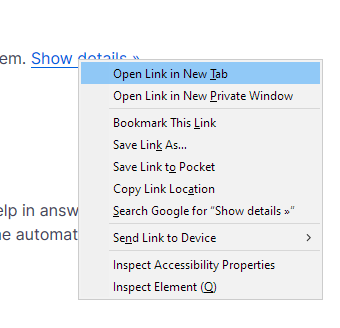
Currently the menu only shows "Open Link in New Tab" and "Open Link in New Private Window"
I seem to remember having to edit something in about:config to get this option in the past, but I just installed Firefox on a new computer and can't find the option.
I'm aware that there are other methods of doing that (middle click), but that's not ideal as I'm really used to using the right-click menu.
선택된 해결법
Hi ned30000, that is the regular context menu for links in private windows. Are you using private windows intentionally?
I can't recall a setting to add "Open Link in New [Non-private] Window" to the menu in that scenario. Perhaps someone else remembers one.
문맥에 따라 이 답변을 읽어주세요 👍 1모든 댓글 (3)
선택된 해결법
Hi ned30000, that is the regular context menu for links in private windows. Are you using private windows intentionally?
I can't recall a setting to add "Open Link in New [Non-private] Window" to the menu in that scenario. Perhaps someone else remembers one.
Thanks for the answer.
I just discovered that enabling the "never remember history" option enables "always private mode" behind the scenes (when I opened preferences subsequently, it showed up differently than when I checked the setting.) So, I was always in private mode with no visual feedback (always on private doesn't show the icon.) In the end that's a pretty misleading/broken UI, but now (I think) it's doing what I want.