


International English - US English with ISO Dates
I am a German but I prefer all my interfaces in English, and I prefer US English so that I get used to spelling consistently using a single variant of English. I have configured my System to use US English in general, but European versions for dates and currencies, so that I still have a sane date format (seriously, stop this M/D/Y madness) and ideally Euros. But it seems like there is no option to do something like this in Firefox.
모든 댓글 (3)
Does toggling this pref on the about:config page has effect ?
- intl.regional_prefs.use_os_locales
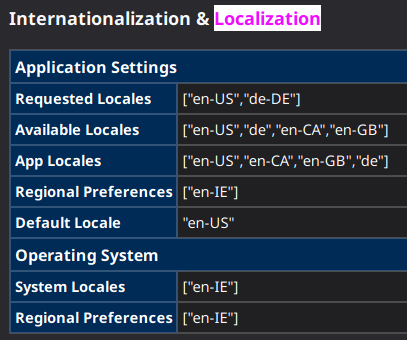
What is listed on the "Help -> Troubleshooting Information" (about:support) page under "Internationalization & Localization" ?
I have tried setting it, I am honestly not sure if anything changed, doesn't look like it in the about:support.
For the system I'm using en-IE since this is the closest to what I want, but I guess that isn't available in Firefox.
did you try this