


flash update makes firefox 62 freeze

When I sign out of a game on facebook that uses flash it freezes firefox, also when I sign out of xfinity that uses flash...same thing, firefox freezes. I have to go to task manager to end task and then run a cleaner to remove cache and cookies.
모든 댓글 (2)
Try disabling graphics hardware acceleration in Firefox. Since this feature was added to Firefox it has gradually improved but there are still a few glitches.
You will need to restart Firefox for this to take effect so save all work first (e.g., mail you are composing, online documents you're editing, etc.,) and then perform these steps:
In Firefox 54 and below:
- Click the menu button
 and select Options (Windows) or Preferences (Mac, Linux).
- Select the Advanced panel and the General tab.
- Uncheck Use hardware acceleration when available.
- Close Firefox completely and then restart Firefox to see if the problem persists.
In Firefox 55 and above:
- Click the menu button and select Options (Windows) or Preferences (Mac, Linux).
- Select the General panel.
- Under Performance, uncheck Use recommended performance settings. Additional settings will be displayed.
- Uncheck Use hardware acceleration when available.
- Close Firefox completely and then restart Firefox to see if the problem persists.
Did this fix your problems? Please report back to us!
If the problem is resolved, you should check for updates for your graphics driver by following the steps mentioned in these Knowledge base articles:
FFus3r said
Try disabling graphics hardware acceleration in Firefox. Since this feature was added to Firefox it has gradually improved but there are still a few glitches. You will need to restart Firefox for this to take effect so save all work first (e.g., mail you are composing, online documents you're editing, etc.,) and then perform these steps: In Firefox 54 and below:In Firefox 55 and above:
- Click the menu button
- Select the Advanced panel and the General tab.
- Uncheck Use hardware acceleration when available.
- Close Firefox completely and then restart Firefox to see if the problem persists.
Did this fix your problems? Please report back to us! If the problem is resolved, you should check for updates for your graphics driver by following the steps mentioned in these Knowledge base articles:
- Click the menu button
- Select the General panel.
- Under Performance, uncheck Use recommended performance settings. Additional settings will be displayed.
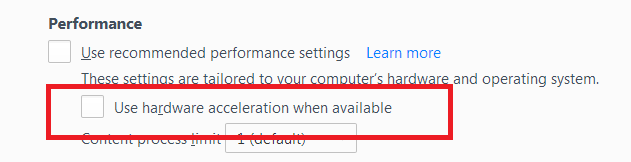
- Uncheck Use hardware acceleration when available.
- Close Firefox completely and then restart Firefox to see if the problem persists.
I'm using Firefox 62. The information you gave me must be outdated. There is not "advanced" option after clicking the menu button, and then options. There is only General, Home, Search, Privacy & Security, and Firefox Account (which is to sync to other devices). Thanks for trying.
I was able to Uncheck Use hardware acceleration when available by right clicking on the program that was using flash. Then restarting windows and it didn't help.