


Many usual keyboard shortcuts not available.

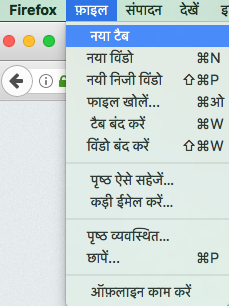
I have Firefox version 53.0.3 (64 beta) currently installed on my mac os Sierra 10.12.4 macbook. The keyboard shortcuts: Command+T (new tab), Command+R (reload page) and Command+F (find in page) don't do anything. The Firefox menus appear in Devnagari (Hindi script). The "File" menu has an option for "New Tab", but the usual shortcut (Command+T) is not listed next to it. There is no shortcut listed for "New Tab". Same for "Find in Page".
글쓴이 karnams 수정일시
모든 댓글 (4)

Start Firefox in Safe Mode {web link} by holding down the <Shift> (Mac=Options) key, and then starting Firefox.
A small dialog should appear. Click Start In Safe Mode (not Refresh). Is the problem still there?
Will try it when I get back to my home machine.
Thanks
The Devanagari language version might be using different keyboard shortcut, so try the en-US version if you used this version before.
If the Firefox user interface (toolbars) is in the wrong language or if you want to change the current language then download Firefox in the language of your choice.
Just updating on "safe mode": the keyboard shortcuts are missing in "safe mode" too. As for install in en_US, will try that when I get a chance. Sorry for slower responses, as this is on my home machine.