


During instalation Firefox 64 anounces that in needs 101 Mb, then it appears 363 Mb. Why?
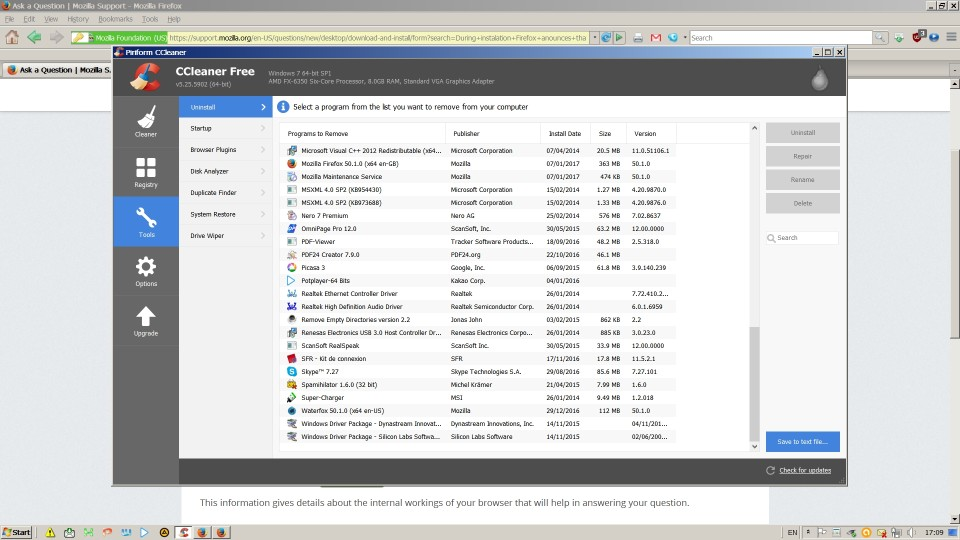
Hello. During instalation Firefox 64 anounces that in needs 101 Mb. Then, in the Control Panel/Programs it appears that it has somehow become 363 Mb. I use only 5 small add-ons. At the same time, as you can see it on the picture, with exactly the same add-ons, Waterfox is only 112 Mb. Could you telle me whay such difference? Thanks
모든 댓글 (4)
You can check the size of the Firefox program folder.
- (32 bit Windows) "C:\Program Files\Mozilla Firefox\"
- (64 bit Windows) "C:\Program Files (x86)\Mozilla Firefox\"
Maybe the Firefox profile folder is included.
Firefox uses two locations for the Firefox profile folder. Location used for the main profile in "AppData\Roaming" that keeps your personal data.
- C:\Users\<user>\AppData\Roaming\Mozilla\Firefox\Profiles\<profile>\
Location used for the disk cache and other temporary files in "AppData\Local".
- C:\Users\<user>\AppData\Local\Mozilla\Firefox\Profiles\<profile>\
Thank yoy very much for your answer. Unfortunately, it doesn't solve the problem (if it could be called a problem at all) because only the program folder C:\Program Files\Mozilla Firefox is 363 Mb. What I noticed is that the program folder is not in the C:\Program Files (x86) but in "C:\Program Files. Does, in your opinion, it makes the difference. Best regards.
What files and folders are taking up the extra space?
You can do a clean reinstall and make sure to delete the Firefox program folder. Download a fresh copy of the Firefox installer.
glarmianov said
What I noticed is that the program folder is not in the C:\Program Files (x86) but in "C:\Program Files.
Generally speaking:
- C:\Program Files (x86) has 32-bit programs on 64-bit Windows
- C:\Program Files has 64-bit programs on 64-bit Windows
It's possible that if you switch between 32-bit and 64-bit Firefox, that "rule" may be broken.
My C:\Program Files (x86)\Mozilla Firefox\ (32-bit on 64-bit Windows) is about 92MB so your 64-bit version at 363MB seems rather high to me by comparison.