


Search Tab and Search Functions are not working

After some problems (different to this problem) I decided to entirely remove firefox from my Linux Mint XFCE 17.1 through sudo apt-get purge firefox , for good measure also deleting .mozilla/firefox/ , .macromedia/ and .adobe in my home directory. Also deleted /etc/firefox/, and /usr/lib/firefox/ and /usr/lib/firefox-addons/
Through the Linux Mint package manager I reinstalled firefox.
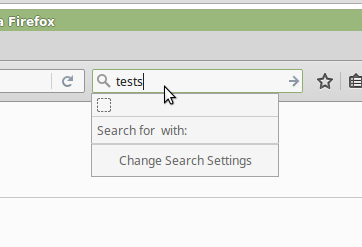
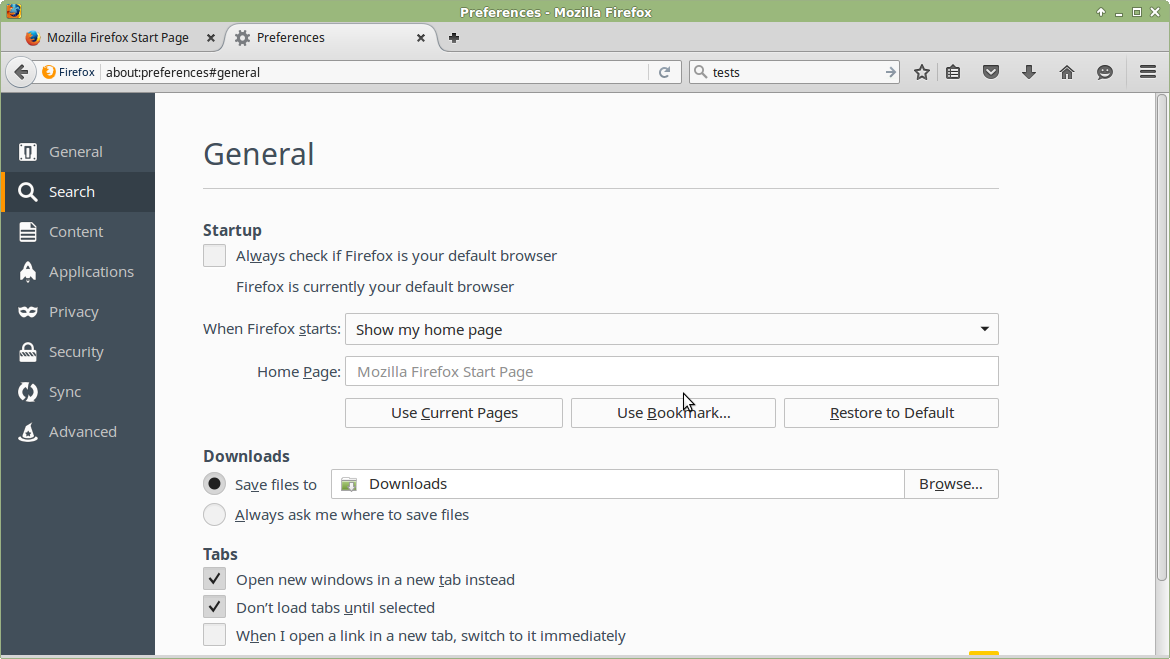
Now, I experience several problems related to search - under Preferences, I cannot select the Search tab: 'Search' is highlighted, but it shows the contents of the 'General' tab, above. All the other tabs work fine. (See figure) - when I type something in the search box, it shows up empty. (See figure.) And I cannot click anything.
I have tried every suggestion I could google, and I have reinstalled firefox several times now. Also, I don't have any add-ons, extensions or similar added, i.e. it is a clean installation of firefox on the system. (And browsers work fine.)
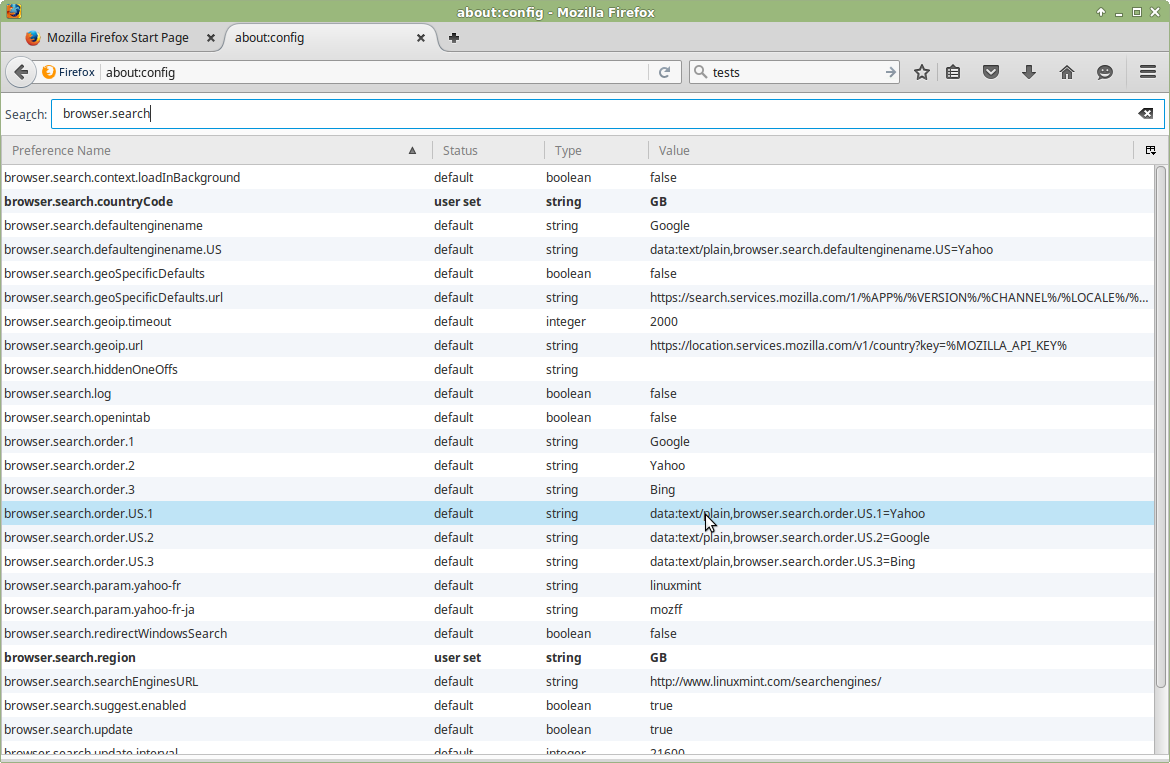
Finally, enclosed is also a screenshot from about:config and below is an error message in the terminal when I run firefox from the commandline.
Can you please help? Thank you.
A coding exception was thrown and uncaught in a Task.
Full message: TypeError: engine is null Full stack: this.ContentSearch._currentEngineObj<@resource://app/modules/ContentSearch.jsm:443:9 TaskImpl_run@resource://gre/modules/Task.jsm:314:40 TaskImpl@resource://gre/modules/Task.jsm:275:3 createAsyncFunction/asyncFunction@resource://gre/modules/Task.jsm:249:14 this.ContentSearch._currentStateObj<@resource://app/modules/ContentSearch.jsm:424:28 TaskImpl_run@resource://gre/modules/Task.jsm:314:40 TaskImpl@resource://gre/modules/Task.jsm:275:3 createAsyncFunction/asyncFunction@resource://gre/modules/Task.jsm:249:14 this.ContentSearch._onMessageGetState@resource://app/modules/ContentSearch.jsm:221:12 this.ContentSearch._onMessage<@resource://app/modules/ContentSearch.jsm:215:13 TaskImpl_run@resource://gre/modules/Task.jsm:314:40 Handler.prototype.process@resource://gre/modules/Promise.jsm -> resource://gre/modules/Promise-backend.js:934:23 this.PromiseWalker.walkerLoop@resource://gre/modules/Promise.jsm -> resource://gre/modules/Promise-backend.js:813:7 this.PromiseWalker.scheduleWalkerLoop/<@resource://gre/modules/Promise.jsm -> resource://gre/modules/Promise-backend.js:747:1
선택된 해결법
In the other thread, https://support.mozilla.org/questions/1101545 the following suggestions were made:
"Did you try a new profile?" I tried that but it did not solve the problem.
"Try the version from the official Mozilla server if you currently use a version from the repositories of your Linux distribution." I did that and the problem did not occur! So, good. :-)
My conclusion is now that it is either a problem in the firefox version in the repositories (seems unlikely since nobody else appears to have this problem) or my system is somehow corrupted (more likely). I will therefore fully reinstall my system and see if the problem reoccurs.
Thanks to all for the support!
문맥에 따라 이 답변을 읽어주세요 👍 0모든 댓글 (12)
And a few screenshots - I was not successful uploading them in my first message. Thanks again for your help in advance!
It's possible that either your Firefox program files are corrupted -- since the search plugins are included in that directory -- or that the settings file which stores metadata on those plugins is corrupted. Let's start with the latter.
Rename search metadata files and have Firefox regenerate them
Open your current Firefox settings (AKA Firefox profile) folder using either
- "3-bar" menu button > "?" button > Troubleshooting Information
- (menu bar) Help > Troubleshooting Information
- type or paste about:support in the address bar and press Enter
In the first table on the page, click the "Open Directory" button. This should launch a new window listing various files and folders in the Linux file browser.
Leaving that window open, switch back to Firefox and Exit, either:
- "3-bar" menu button > "power" button
- (menu bar) File > Exit/Quit
Pause while Firefox finishes its cleanup, then
- Rename search.json to something like search.old
- If found, Delete search.sqlite
- If found, rename search-metadata.json to something like search-metadata.old
Start Firefox back up again. Does Firefox display search engines now?
If that doesn't work, I suggest a reinstall (without removing data, although perhaps that doesn't matter after your previous deep cleaning).
Thank you jscher2000.
Sorry to say, your steps did not resolve the problem, nor did a reinstall through:
sudo apt-get purge firefox* sudo apt-get install firefox
Any other suggestions? Thanks.
Any difference in Firefox's Safe Mode? See: Use Troubleshoot Mode in Firefox)
No difference, problems persist. :-(
Have I maybe removed too much data with my 'deep clean'? I have installed Chromium and that one works fine with the default search engine. But I prefer Firefox! :-)
I'm not familiar with Firefox on Linux, so I'll step back and let someone more familiar with your OS and/or distribution comment.
OK thank you for your support jscher2000.
Is this your thread, too?
It is. I thought it did not exist, because I put in a wrong email address which is also why I had not seen it did exist. Can the other thread be merged with this one? Sorry about this, it wasn't my intention to post it twice!
선택된 해결법
In the other thread, https://support.mozilla.org/questions/1101545 the following suggestions were made:
"Did you try a new profile?" I tried that but it did not solve the problem.
"Try the version from the official Mozilla server if you currently use a version from the repositories of your Linux distribution." I did that and the problem did not occur! So, good. :-)
My conclusion is now that it is either a problem in the firefox version in the repositories (seems unlikely since nobody else appears to have this problem) or my system is somehow corrupted (more likely). I will therefore fully reinstall my system and see if the problem reoccurs.
Thanks to all for the support!
I also experienced this after updating to Firefox 45 on Linux Mint Debian Edition. I realize this isn't a Mint-specific support forum, but for reference, the exact package version was 45.0~linuxmint1+betsy.
I successfully worked around the problem by deleting search.json from my profile directory, as well as search.json.mozlz4, which may or may not be related.
My stack trace was similar to the OP's:
A coding exception was thrown and uncaught in a Task.

Full message: TypeError: engine is null
Full stack: this.ContentSearch._currentEngineObj<@resource://app/modules/ContentSearch.jsm:487:9
TaskImpl_run@resource://gre/modules/Task.jsm:315:40
TaskImpl@resource://gre/modules/Task.jsm:276:3
createAsyncFunction/asyncFunction@resource://gre/modules/Task.jsm:250:14
this.ContentSearch._currentStateObj<@resource://app/modules/ContentSearch.jsm:468:28
TaskImpl_run@resource://gre/modules/Task.jsm:315:40
TaskImpl@resource://gre/modules/Task.jsm:276:3
createAsyncFunction/asyncFunction@resource://gre/modules/Task.jsm:250:14
this.ContentSearch._onMessageGetState@resource://app/modules/ContentSearch.jsm:258:12
this.ContentSearch._onMessage<@resource://app/modules/ContentSearch.jsm:252:13
TaskImpl_run@resource://gre/modules/Task.jsm:315:40
Handler.prototype.process@resource://gre/modules/Promise.jsm -> resource://gre/modules/Promise-backend.js:933:23
this.PromiseWalker.walkerLoop@resource://gre/modules/Promise.jsm -> resource://gre/modules/Promise-backend.js:812:7
this.PromiseWalker.scheduleWalkerLoop/<@resource://gre/modules/Promise.jsm -> resource://gre/modules/Promise-backend.js:746:1
exports.Utils.yield@resource://gre/modules/addons/XPIProvider.jsm -> jar:file:///home/sruggier/.mozilla/firefox/mwad0hks.default/extensions/%7Bd10d0bf8-f5b5-c8b4-a8b2-2b9879e08c5d%7D.xpi!/bootstrap.js -> jar:file:///home/sruggier/.mozilla/firefox/mwad0hks.default/extensions/%7Bd10d0bf8-f5b5-c8b4-a8b2-2b9879e08c5d%7D.xpi!/lib/utils.js:361:12
INIParser.prototype.process@resource://gre/modules/addons/XPIProvider.jsm -> jar:file:///home/sruggier/.mozilla/firefox/mwad0hks.default/extensions/%7Bd10d0bf8-f5b5-c8b4-a8b2-2b9879e08c5d%7D.xpi!/bootstrap.js -> jar:file:///home/sruggier/.mozilla/firefox/mwad0hks.default/extensions/%7Bd10d0bf8-f5b5-c8b4-a8b2-2b9879e08c5d%7D.xpi!/lib/filterStorage.js:798:7
exports.IO.readFromFile/onProgress@resource://gre/modules/addons/XPIProvider.jsm -> jar:file:///home/sruggier/.mozilla/firefox/mwad0hks.default/extensions/%7Bd10d0bf8-f5b5-c8b4-a8b2-2b9879e08c5d%7D.xpi!/bootstrap.js -> jar:file:///home/sruggier/.mozilla/firefox/mwad0hks.default/extensions/%7Bd10d0bf8-f5b5-c8b4-a8b2-2b9879e08c5d%7D.xpi!/lib/io.js:97:15
exports.IO.readFromFile/<@resource://gre/modules/addons/XPIProvider.jsm -> jar:file:///home/sruggier/.mozilla/firefox/mwad0hks.default/extensions/%7Bd10d0bf8-f5b5-c8b4-a8b2-2b9879e08c5d%7D.xpi!/bootstrap.js -> jar:file:///home/sruggier/.mozilla/firefox/mwad0hks.default/extensions/%7Bd10d0bf8-f5b5-c8b4-a8b2-2b9879e08c5d%7D.xpi!/lib/io.js:182:11
TaskImpl_run@resource://gre/modules/Task.jsm:315:40
Handler.prototype.process@resource://gre/modules/Promise.jsm -> resource://gre/modules/Promise-backend.js:933:23
this.PromiseWalker.walkerLoop@resource://gre/modules/Promise.jsm -> resource://gre/modules/Promise-backend.js:812:7
this.PromiseWalker.scheduleWalkerLoop/<@resource://gre/modules/Promise.jsm -> resource://gre/modules/Promise-backend.js:746:1