


Have to wait to reboot after upgrade but want the popup reminder to stop

I got the latest update from Firefox automatically so I'm updated. Now I keep getting the darn popup that says "Your computer must be rebooted to complete blah blah blah" I'm in the middle of a UI project and can't reboot but I want the popup reminder to stop popping up because I'm in the middle of gui testing and its' messing with my numbers.
How do I make the reboot reminder to stop?
Thanks, -Jacque
모든 댓글 (8)
Is it the one that has a Postpone button that you can send away for 4 hours, or a different dialog? We might have to refer you to a Windows 7 forum for anything more sophisticated than that...
Thanks for the quick reply!
No Postpone button unfortunately - just a 'Yes' and a 'No' option. Since I can't reboot I have to select no - this means the message appears the next time I run a test. :(
Is it system modal or can you use Window key + m to minimize it to the task bar?
I'm not sure why you are getting that dialog. I can't think of any part of a Firefox update that requires a reboot. ??
Firefox doesn't require Windows reboots, do you mean this is just the prompt that requires Firefox restarts?
I'm getting a popup (see attached) that says that I must restart my computre to complete a previous upgrade of firefox. It appears anytime I open a new firefox window (not tab - just window) Painful for the automated test scripts.
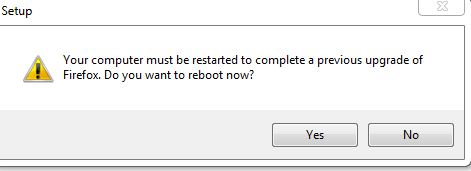
hi jacqueweddle, this doesn't look normal - maybe this is something that can be addressed by a clean reinstall:
- download the full firefox installer from https://www.mozilla.org/firefox/all/
- uninstall firefox from the windows control panel (this won't affect your custom settings like bookmarks, passwords, extensions that are stored in your profile)
- afterwards go to the firefox program folder, which is usually located at C:\Program Files (x86)\Mozilla Firefox, and delete it manually if there are any remains in it.
- finally reinstall the browser with the setup file you have downloaded initially...
If I complete the steps listed, I won't have to reboot?
No, Firefox updates don't require system reboots (which is why that message doesn't make sense) so this should fix that issue.