

이 쓰레드는 보존되었습니다.
만약 도움이 필요하시면 새로운 질문을 올려주세요.

보존
What's this, when mouse move on a href ?

When the mouse move on a href, a samll icon will apear, and if mouse hove on the icon, the href details will be showed. like: https://www.sample.com/....
#Base64
When the mouse move on a href, a samll icon will apear, and if mouse hove on the icon, the href details will be showed.
like: https://www.sample.com/....
#Base64
모든 댓글 (4)
here is the screenshot.
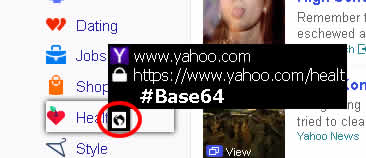
how to close this function?
Firefox doesn't do this by default, so this feature is added by an extension or theme.
Start Firefox in Safe Mode to check if one of the extensions (Firefox/Tools > Add-ons > Extensions) or if hardware acceleration is causing the problem.
- Switch to the DEFAULT theme: Firefox/Tools > Add-ons > Appearance
- Do NOT click the Reset button on the Safe Mode start window
Yes, thanks. With the methods on https://support.mozilla.org/en-US/kb/troubleshoot-extensions-themes-to-fix-problems#w_the-problem-does-not-occur-in-safe-mode, I got the root cause: extension "Redirect Bypasser".