Links not functioning repeatedly

Hi. I have noticed over the last few weeks, so maybe related to the 155. If I am on a website with links the browser doesn't respond to many links, in fact no links most … (read more)

Hi. I have noticed over the last few weeks, so maybe related to the 155.

If I am on a website with links the browser doesn't respond to many links, in fact no links most of the time.

This only happens usually after the first link has worked. There is no data in the status bar for the link.

If I close the link I have opened, always in a new tab, then other links will then work.

It is as it the details of the URL path are not being recognised, almost like something is saying : Hey you are already looking at this site don't be greedy and expect me to open multiple page with the same domain.

I did see a similar query a while ago but can't find it.

So not a critical problem.

Oh yes. When this happens I also cannot right-click to open in a new tab as an alternative.

Thanks

Hope everyone is having at least a half decent day. :)
Solved 1

see no way send

Bugzilla Report Package Product: Developer Tools Component: General / Debugger Title: [Source Map Loader] Worker crash due to unhandled JSON.parse error on non-JSON/HTML … (read more)

Bugzilla Report Package

Product: Developer Tools

Component: General / Debugger

Title: [Source Map Loader] Worker crash due to unhandled JSON.parse error on non-JSON/HTML responses in fetchSourceMap.js

Description:

When fetching source maps in a worker context, fetchSourceMap.js occasionally encounters an unexpected non-JSON response (such as an HTML error page or 404 response starting with ). This causes an unhandled JSON.parse exception at line 83 (_fetch), crashing the source map consumer.

Stack Trace: Plaintext

Source map error: Error: JSON.parse: unexpected character at line 1 column 1 of the JSON data Stack in the worker: parseSourceMapInput@resource://devtools/client/shared/vendor/source-map/lib/util.js:163:15 _factory@resource://devtools/client/shared/vendor/source-map/lib/source-map-consumer.js:1069:22 SourceMapConsumer@resource://devtools/client/shared/vendor/source-map/lib/source-map-consumer.js:26:12 _fetch@resource://devtools/client/shared/source-map-loader/utils/fetchSourceMap.js:83:19

Proposed Patch (fetchSourceMap.js - Line 83): JavaScript

// Replace direct unhandled parse at line 83 with safe parsing: const sourceMap = (() => {

 try {
   const trimmed = responseText ? responseText.trim() : "";
   if (trimmed.startsWith("<") || trimmed.startsWith("

})();

Locked 2

English text is sometimes broken when Japanese text is present

I've been using Firefox for a couple months now, and I just ran into this problem today with English text nearby Japanese text: https://files.catbox.moe/diw4y3.png It's… (read more)

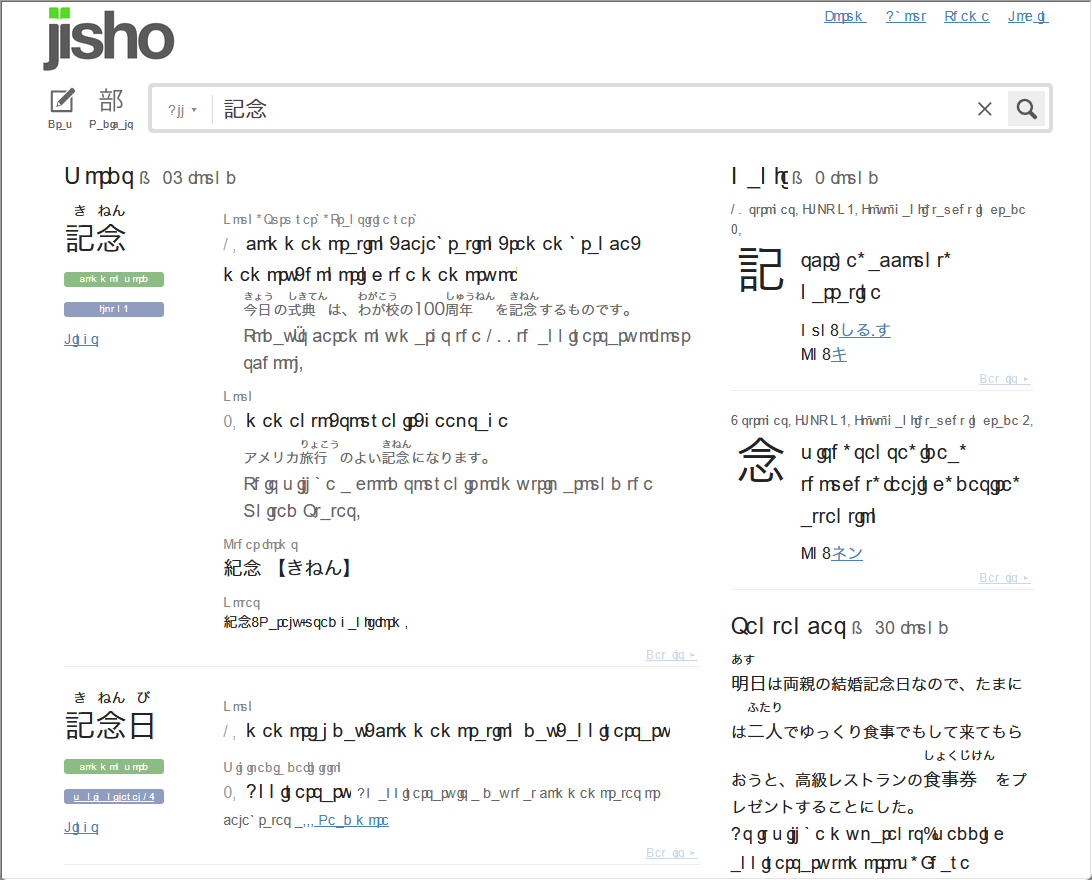
I've been using Firefox for a couple months now, and I just ran into this problem today with English text nearby Japanese text: https://files.catbox.moe/diw4y3.png

  • It's not affecting Japanese text
  • It's not exclusive to Japanese websites (it's present in one email in gmail, but not all of them)
  • I haven't seen it on any Japanese websites
  • It's also present in some add-ons that generate text (Checker Plus for Gmail, Yomichan)
  • Turning off all add-ons doesn't fix it, but opening the page in a private window does fix it

Firefox 155.0.1 (64-bit), Windows 11 Pro

Solved 1

"Forward Delete" Key Does Not Work When Typing File Name in macOS Firefox "Save As" Window

Steps to reproduce: View a PDF within Firefox Select the 'Save' icon Click within the file name field, right next to "Save As" The "forward delete" key ('Delete' on … (read more)

Steps to reproduce:

  • View a PDF within Firefox
  • Select the 'Save' icon
  • Click within the file name field, right next to "Save As"
  • The "forward delete" key ('Delete' on a Windows keyboard) does not work. It used to work in previous versions of Firefox, but no longer works.
  • The "backwards delete" key ('Backspace' on a Windows keyboard) works without issue.

Firefox 155.0.1

Solved 1 2

I am trying to restore Firefox from a backup and have forgotten my Firefox password.

Well, I am in a real mess. Three days ago I lost the ability to access my favourite website. I CAN access the website in the Brave browser. The website owner has told me … (read more)

Well, I am in a real mess. Three days ago I lost the ability to access my favourite website. I CAN access the website in the Brave browser. The website owner has told me that it is not a problem with my account with them so it must be a Firefox issue. Before this happened I had been trying to move and delete files on my laptop and have got very confused about EVERYTHING. In that I had deleted my Firefox recovery folder(s). I have managed to move them back into my Home folder before they expire. Now I am being asked to enter my "password" to initiate the restore. But the several Firefox passwords in my laptop are not being accepted. How can I get a new password? If that is not possible do I have to delete my Firefox account? What is my best way to recover from this mess? Any advice is greatly appreciated.

Solved 7

Impossible get internet linq

Code d’erreur : PR_END_OF_FILE_ERROR With “Mozilla MSIX” : 154.0.1 (64 bits) !!! 154.0.1 (64 bits) In French : Ordinateur Win11 Pro 64b, Ryzen 7 7700, 16GO RAM, depuis n… (read more)

Code d’erreur : PR_END_OF_FILE_ERROR With “Mozilla MSIX” : 154.0.1 (64 bits) !!! 154.0.1 (64 bits) In French : Ordinateur Win11 Pro 64b, Ryzen 7 7700, 16GO RAM, depuis nouvelle Mozzilla version 154.0.1, impossible d'ouvrir un lien dans 1 newsletter. Code d'erreur toujours présent et invalidant toute action... Retour vers version ancienne? - Connaissez-vous une solution?

ECRAN : https://www.google.com/url?q=https://www.acdsee.com/fr/free-trials/&source=gmail&ust=1789373797568000&usg=AOvVaw0r97LHaluKcIfsVm_5mGCu

Solved 1

Why is the compose key not working with the most recent Firefox?

I'm using Mozilla's Firefox Debian package, Firefox 155.0.1 (64-bit), on a desktop. Until this version, my compose key worked with no problem, in Firefox and all other a… (read more)

I'm using Mozilla's Firefox Debian package, Firefox 155.0.1 (64-bit), on a desktop. Until this version, my compose key worked with no problem, in Firefox and all other applications. Now it works with all other applications, but not Firefox.

My .bashrc includes this line: export GTK_IM_MODULE=xim

I checked about:config, and focusmanager.testmode is set to false.

Any ideas? I can't type my name without the compose key...

Solved 2

Firefox becoes extremely slow after opening too many tabs

Hi, I am using Firefox For a few years, but for last 1 year my workload is high and I usually need to open several tabs. After I keep tabs open for a while, firefox becom… (read more)

Hi, I am using Firefox For a few years, but for last 1 year my workload is high and I usually need to open several tabs. After I keep tabs open for a while, firefox becomes slow. Closing a few tabs help but I want to know what is causing it. IS there a way to check which tab or extension is causing it? I am using latest firefox on windows 11.

Solved 1

Quality of audio output changes when starting a new window

Has anybody else experienced a similar problem? Or can you help me trouble shoot this issue please? I'm busy playing audio in a tab of the browser. The sound quality is g… (read more)

Has anybody else experienced a similar problem? Or can you help me trouble shoot this issue please?

I'm busy playing audio in a tab of the browser. The sound quality is good (rich, full, deep). Next, I open a new window by any means (Ctrl+N / Open link in new window / Menu > New window) As the new window appears, the current audio playback becomes tinny / lower quality. After a 3 seconds, the normal good sound quality starts again.

I'm currently using Bluetooth connected headphones and this happens on different headphones. I have to find some wired headphones first before I can try that. This happens with every new window that I open, regardless of the number of open tabs in current windows or how many previous open windows I already have. This happens regadless if audio enhancements of the output device are enabled or not. Spatial sound is set to off. Windows is set to 'do nothing' & will not adjust the volumes of different sounds when I'm using my PC to place or receive telephone calls.

OS: Windows 11 with latest patches Firefox: latest & older builds Hardware drivers: All manufacturer drivers applied

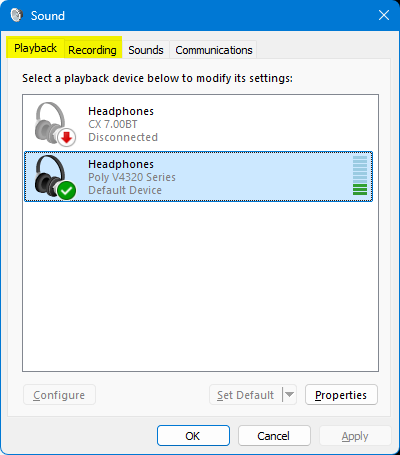
PS I can replicate this issue by changing between the 'Playback' & 'Recording' tab in the Sound Control Panel applet. That is to say, the same decrease in audio quality happens when I change from the Playback tab to the Recording tab. Audio quality improves again when I change from the Recording tab to the Playback tab https://assets-prod.sumo.prod.webservices.mozgcp.net/media/uploads/images/2026-09-12-15-38-23-1accad.png

PPS My new windows are set to open on 'about:support'

PPPS Can't reply to previously archived question : https://support.mozilla.org/en-US/questions/1525613

Solved 1

all of my bookmarks are missing & my downloads

Help! My bookmarks tool bar is missing & I cant recover it because your instructions for locating the menu bar don't match what your instructions display. There is N… (read more)

Help! My bookmarks tool bar is missing & I cant recover it because your instructions for locating the menu bar don't match what your instructions display. There is NO AltGr displays a bookmark menu BUT I CANT MOVE IT TO MY TOOL BAR. There is NO selected tab, NO menu bar; NO bookmark tool displayed. I have also lost all of my downloads. This has happened in the last month; everything was fine. I am 82 years old & NOT a techie so expect better help than I have received so far during the last frustrating 2 hours of trying to follow Firefox instructions that DO NOT APPLY TO ME. Also the "add images" function @ bottom of this page won't let me send you a copy of the instructions you display to select the bookmark menu bar ... I click on the picture of the problem & nothing happens ... just dead no access to select pictures either.

I have NOT changed my internet provider; I have not changed any settings. This all happened two weeks ago. Called internet provider & they said it was Firefox issue!!! Very unhappy.

Locked 1

Exceptions list isn't being respected

I usually have checked the option for clearing cookies and site data every time I close Firefox. However there is an exception list where I add sites I visit often and I … (read more)

I usually have checked the option for clearing cookies and site data every time I close Firefox. However there is an exception list where I add sites I visit often and I prefer to keep its browsing data. This list of exceptions seems to be ignored. The sites I have in the list lose all their browsing data.

The only solution I have found so far is not check the option to clear browsing data.

I remember this function stopped working correctly right after I decided to wipe all browsing data manually.

Solved 2

Please instruct me how to permanently disable the PW Manager in all Mozilla software.

I do not wish any of my passwords to be stored anywhere it isn't absolutely necessary. My own highly secure method I've been using for many years is listing them all on a… (read more)

I do not wish any of my passwords to be stored anywhere it isn't absolutely necessary. My own highly secure method I've been using for many years is listing them all on a removable drive that is encrypted and only in my PC's when necessary. Therefore, I wish to disable any and all PW Managers in the software I use. Please instruct me how to permanently disable the PW Manager in all Mozilla software.

Everything is stated above with an explanation of the reason.

Thanks for your help. TJS

Solved 2