


An unistaled program is constantly changing my homepage.

I have downloaded bearshare, a program to download songs from internet. I uninstalled it but every time i open Firefox i see as a home page Bearshares homepage and i cant change it. (when i change it, after a restart on Firefox it turns again on bearshares) Can you help me?
ყველა პასუხი (4)
Check that you do not have a file user.js in the Firefox Profile Folder
See also this forum thread about BearShare:
I dont have a file named user.js on Firefox Profile Folder. I cant find a file named MediaBar.dll i believe that i have uninstall it. At the registry's i cant find the entries described in: http://www.ehow.com/how_6609141_remove-bearshare-spyware.html and at the Command Prompt i get the warning: "The module "MediaBar.dll" failed to load" (picture attached) after i type "regsvr32 /u MediaBar.dll"(as described on ehow). At the Firefox's Add-ons manages i found the extension "MediaCenter" (or something like that) and i removed it.
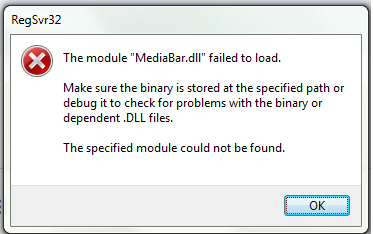
edit: Found the solution. I just noticed that in the uninstall Board in Control Panel was MediaBar. I hit uninstall and now it is gone. Thanks for your time.
ჩასწორების თარიღი: , ავტორი: masuimi
I had this exact same problem after uninstalling Bearshare. Turns out there is a little program called Media Bar 2.0 that they don't tell you about. I found it unistalled it and now my browser works just fine and stays where I want it to in the options, home page setting.
Hope this helps.