


How do you change the border/highlight color in Split View?

Hi people. I use Split View a lot in FF browser and love the feature where when you click from side to side on each window you get a color highlight/border surrounding the active window, default is blue, but I would love it even more if I could choose my own custom color, I'm thinking a deeper cobalt electric blue or even a deep red. Can you change this color in settings? If not, how would I get this suggestion submitted?
ყველა პასუხი (3)
Bonsoir
A space for users to give product feedback https://support.mozilla.org/en-US/kb/what-mozilla-connect
Discussions, https://connect.mozilla.org/t5/discussions/feedback-split-view/m-p/122572/highlight/true#M48178
Of course, this is not the expected answer, nevertheless, below, a test with userChrome.css
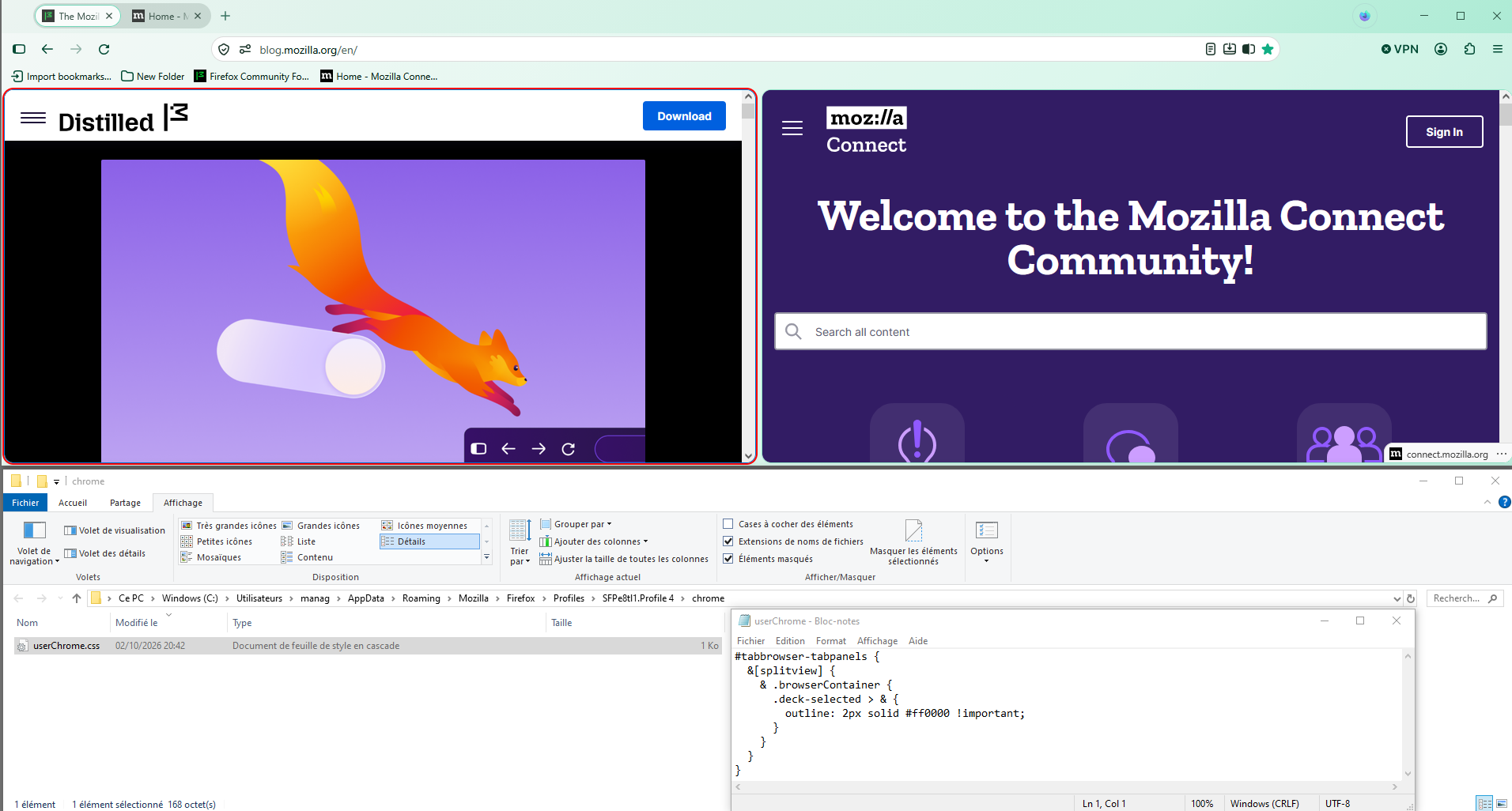
Ok, that sounds like a workaround for me, but where do I put the code in that thread?
Bonjour
colors https://www.w3schools.com/colors/colors_picker.asp
css https://www.reddit.com/r/FirefoxCSS/comments/1s6epeq/comment/od1nmrd
#tabbrowser-tabpanels { &[splitview] { & .browserContainer { .deck-selected > & { outline: 2px solid #ff0000 !important; } } } }
Copy/paste the code into your notepad Save Type: All files userChrome.css
Create a chrome folder Move userChrome.css to your chrome folder
Go to your profile folder https://support.mozilla.org/en-US/kb/profiles-where-firefox-stores-user-data#w_how-do-i-find-my-profile
Move your chrome folder to your profile folder
Go to configuration editor https://support.mozilla.org/en-US/kb/about-config-editor-firefox Enter a search term toolkit.legacyUserProfileCustomizations.stylesheets Double-click on the preference, to set its value to true
And restart Firefox
If you want to change color, modify css and restart Firefox
For information https://support.mozilla.org/en-US/kb/contributors-guide-firefox-advanced-customization