


Hello comunity, I have idea how to delete emails more quickly

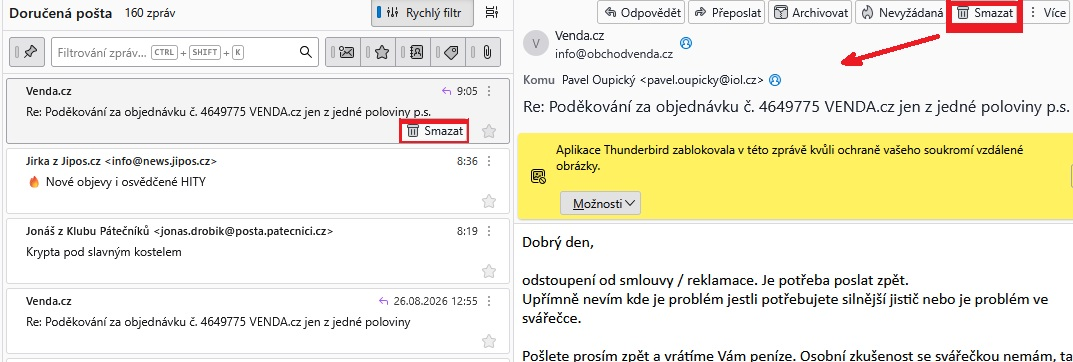
Hello comunity, I have idea how to delete emails more quickly. See my attached printscreen.
Pavel Ou ...
ყველა პასუხი (2)
შერჩეული გადაწყვეტა
If you have already selected to view email, then the Delete button is already available in Message Header.
Are you aware that that area is already set up to get used for other reasons. It's where an attachment icon is displayed or any Tags and I'm sure there may be others, so it's not an unused space.
There are already many ways including....The various methods are designed to work for people whether they use keyboard or mouse or combination.
In 'Cards View' -
- selected email in Message Pane already displays 'Delete'
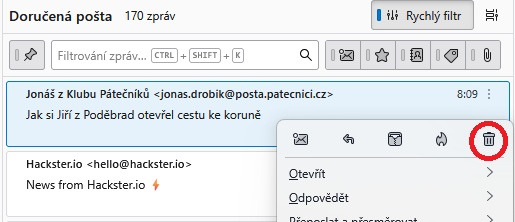
- the 3 vertical dot shows menu - has delete top right
- Or right click to see same pop up menu
- Or you can just press the 'Delete' key on keyboard.
- Or Select email and use keys 'Alt'+'E' and then 'D'
- Or using 'Menu Bar' toolbar - 'Edit' > 'Delete Message'
- Or put the 'Delete' button on the 'Unified Toolbar', then you only have one permanently visible 'Delete' button, so if Message Pane is disabled, you can select email and click on 'Delete'.
In 'Table View' In addition to:
- the 'Delete' already shown in a selected email
- Right click menu has delete
- Use of 'Delete' key on keyboard
- Select email and use keys 'Alt'+'E' and then 'D'
- Use 'Delete' if placed on 'Unified Toolbar'.
You can use this in Table view.....
- Enable the 'Delete' column header and that will show the 'bin' icon against each email - just be careful not to click on it when selecting to view email :)
Thank you for your answer and manual. There is short description of my seeing of the same in my case :
Click on the right maus button and you will see in the top row the five small icons and the basket in that number ... OK for me ...
ჩასწორების თარიღი: , ავტორი: Pavel_Oupicky