


Out of gile storage space?

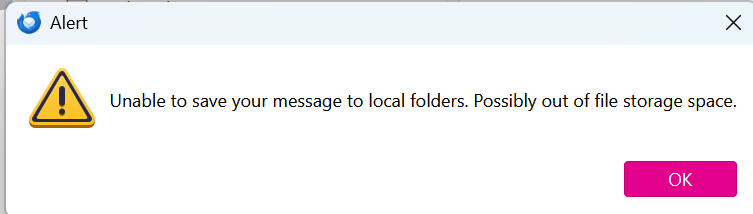
What are the memory limits for Thunderbird. Currently, I get this message when I try to save and email "Unable to save your message to local folders. Possibly out of local file storage space." Please see attached screenshot.
I am not out of storage space.
Any suggestions?
Thank you.
Tom O'Brien
ყველა პასუხი (5)

Thunderbird has no practical storage size limit except for what may be imposed by the operating system. For example, FAT32 has a file size limit of 4 GB. NTFS files can theoretically be as large as 8 petabytes.
What is your operating system?
32- or 64-bit?
What file system does it use?
How large is the folder you're trying to copy to?
ჩასწორების თარიღი: , ავტორი: Lin
Operating system:
   Windows 11,
    64-Bit, 32 GB RAM, 954 GM Storage (320GB Available)
File System: NTFS
To be clear: I am not trying to "copy" to any particular folder. I am trying to "send" different emails with Thunderbird. These are emails are nothing unusual - the normal, small business emails, sometimes with a small PDF attachment - maybe as large as 3 MB. As I wait for the email to go out, it becomes clear that there is some problem because these types of emails are usually gone within a few seconds and Thunderbird resets to its normal state. Eventually, the message dialog box noted above appears.
So the folder the message if going to seems to be Thuderbirds default folder message folder for this account: AppData\Roaming\Thunderbird\Profiles\b5ty3nh8.default-release\ImapMail\imap.gmail-1.com
That folder size is: 7.75 GB
What else can I tell you?
(Any many thanks for your help?)
Tom
Can I assume this is an IMAP account?
It's still unclear to me about what's happening here. By default, when you send an email, a copy of that message is placed in the Sent folder of that account, although you can change the Sent folder location or even turn that feature off.
- Do you find a copy in Sent? Do you get the feeling that Thunderbird is having trouble writing to that specific folder?
- Do you get similar error messages when you copy test emails to other folders? Please try this on Sent and other folders.
- When you go to the Gmail web mail page, do you find a copy in ITs sent folder?
- Check to make sure the designated Sent location is valid. See <Account Settings | (the Gmail account in question) | Copies & Folders | When sending messages, automatically...> and confirm that the "Place a copy" location is correct.
I'm thinking you may have a corrupt folder (probably Sent.) The fix depends on your answers to the above, so let me know what you find and we'll take it from there.
ჩასწორების თარიღი: , ავტორი: Lin
Hi Lin,
Many thanks for the ideas and clues. Given that Thunderbird has been running flawlessly for about a year since I upgraded to a new laptop and reloaded all of my software from scratch using current versions. So this problem is a bit of a surprise and doesn't track directly to any individual event.
I'll do some testing as you suggest and see what clues that produces.
Tom
Another possible factor: your anti-virus, which can take hold of a file and not let go. Assuming you use one, even if Windows' Defender, consider creating an exception so that it doesn't scan your profile folder.