


გადაწვეტილი
Need to disable comment/highlight popup menu for selected text in pdf viewer

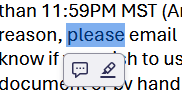
When I select text in firefox's built in pdf viewer, a menu with comment and highlight options automatically pops up. I haven't been able to figure out any way to turn this off. This is a problem because when I'm using the viewer at work firefox now puts this menu exactly over the next piece of information I need. (eg blocks the next row in a process log)
I am using Firefox 153.0.4 (64-bit). Windows 11.
When I select text in firefox's built in pdf viewer, a menu with comment and highlight options automatically pops up. I haven't been able to figure out any way to turn this off. This is a problem because when I'm using the viewer at work firefox now puts this menu exactly over the next piece of information I need. (eg blocks the next row in a process log)
I am using Firefox 153.0.4 (64-bit). Windows 11.
ყველა პასუხი (1)
შერჩეული გადაწყვეტა
Go to about:config and switch pdfjs.enableHighlightFloatingButton to false.