


Heavy browser
Dear Support,
Firefox exhibits significant performance and usability issues related to its cookie and data storage management. Despite implementing ad blocker extensions, the browser remains saturated with cookies and persistent advertisements. Regularly clearing browsing data and cookies is necessary; however, navigating to the settings menu is time-consuming. I recommend developing a browser widget that facilitates rapid data clearing directly from the toolbar or frame. Additionally, implementing a session-saving feature to preserve a set of pinned tabs upon closing and reopening the browser would enhance workflow efficiency, allowing for a quick start with a predefined workspace.
This is all happening while using it for simple tasks like search or copying a text.
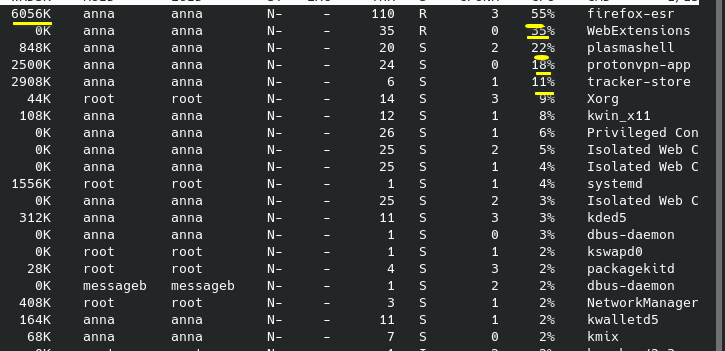
Furthermore, the browser experiences severe performance degradation when utilizing certain web applications, such as Kapwing for video editing. Since uninstalling Vivaldi, I am considering migrating to an alternative browser due to these issues. Tasks that typically require one minute are now prolonged to hours, as the browser intermittently becomes unresponsive, effectively limiting usability. This sluggishness persists even after system restarts, with CPU utilization reaching approximately 50%, as detailed in the attached performance report. Notably, I encountered a significant delay—up to an hour—to correct a single spelling error or open a new tab, indicative of underlying performance bottlenecks.
Please address these issues to improve browser stability and usability.
Estimator Just tell me how long this is probably gonna take: 4 to 16 hours. Not kidding!
ყველა პასუხი (1)
Right, this is really strange. Apparently there's a conflict with other software (for instance VPN). I'm not very linuxy, but try Firefox Troubleshoot Mode to see if the problem goes away. Firefox Troubleshoot Mode is a special diagnostic mode that temporarily turns off hardware acceleration, disables add-ons (extensions and themes) and resets some settings. See the Use Troubleshoot Mode in Firefox article for details.
If Firefox is open, you can restart in Firefox Troubleshoot Mode from the Help menu:
- Click the menu button
 , click Help, select Troubleshoot Mode and click Restart in the "Restart Firefox in Troubleshoot Mode?" dialog that opens.
If Firefox is not running, you can start Firefox in Troubleshoot Mode as follows:
- On Linux: Quit Firefox, go to your Terminal and run firefox -safe-mode
(you may need to specify the Firefox installation path e.g. /usr/lib/firefox)
When the Firefox Troubleshoot Mode window appears, select "Open".
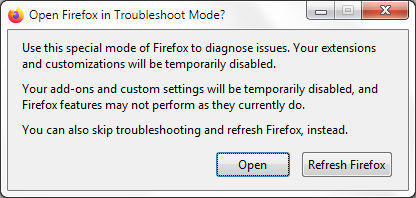
If the issue is not present in Firefox Troubleshoot Mode, your problem is probably caused by an extension, theme or hardware acceleration. Please follow the steps in the Troubleshoot extensions, themes and hardware acceleration issues to solve common Firefox problems article to find the cause.
To exit Firefox Troubleshoot Mode, just close Firefox and wait a few seconds before opening Firefox for normal use again. (If you can't exit Firefox Troubleshoot Mode, please see Firefox is stuck in Troubleshoot Mode).
When you figure out what's causing your issues, please let us know. It might help others with the same problem.