


Windows 10 reached EOS (end of support) on October 14, 2025. If you are on Windows 10, see this article.

Avatar for Username

ძიება მხარდაჭერაში

ნუ გაებმებით თაღლითების მახეში. აქ არავინ უნდა მოგთხოვოთ ტელეფონზე დარეკვა, შეტყობინების გაგზავნა ან პირადი მონაცემების გაზიარება. რამე საეჭვოს შემჩნევისას გთხოვთ გვაცნობოთ „დარღვევის მოხსენებით“.

ვრცლად
ღია

Can't find outgoing server after login following Win 11 sleeps

david პასუხგაცემული
Irwin D

Thunderbird functions normally (sends/receives), except after Windows 11 goes to sleep, I log back in without difficulty., but attempting to use Thunderbird to send email fails with the message

"Sending of the message failed. The message could not be sent because connecting to Outgoing server (SMTP) smtp.mail.me.com failed. The server may be unavailable or is refusing SMTP connections. "

There's no prompt to re-enter the primary password, and the only way to restore normal Thunderbird operation is by rebooting WIN 11. Is this a known bug with a workaround? The failure occurs whether the outgoing server is smtp.mail.me.com (Apple), smtp.comcast.net, or smtp.gmail.com
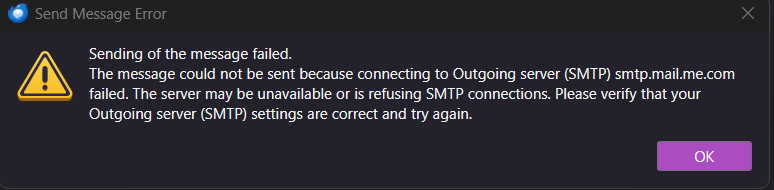
Thunderbird functions normally (sends/receives), except after Windows 11 goes to sleep, I log back in without difficulty., but attempting to use Thunderbird to send email fails with the message "Sending of the message failed. The message could not be sent because connecting to Outgoing server (SMTP) smtp.mail.me.com failed. The server may be unavailable or is refusing SMTP connections. " There's no prompt to re-enter the primary password, and the only way to restore normal Thunderbird operation is by rebooting WIN 11. Is this a known bug with a workaround? The failure occurs whether the outgoing server is smtp.mail.me.com (Apple), smtp.comcast.net, or smtp.gmail.com
მიმაგრებული ეკრანის სურათები

ყველა პასუხი (1)

THis may be a Windows issue, where some components do not awaken. Thunderbird just rides on that horse and is dependent that it works.

დასვით კითხვა

უნდა შეხვიდეთ ანგარიშზე პასუხის დასაწერად. გთხოვთ, დასვათ ახალი შეკითხვა, თუ ჯერ არ გაქვთ ანგარიში.