


Print page margins in mm or inches

Ffx 147.0 / Mac OS Tahoe 26.2 / HP printers
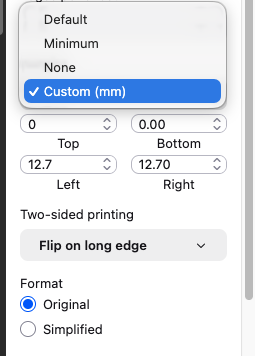
Print dialog page margin custom values appear in mm only. No option for inches here.
As recommended years ago for earlier Mac OS and Ffx versions, I've tried the about:config dialog. Changed several universal page margin unit settings from 1 (mm) to 0 (inches), and also or my specific printers, for top, bottom, left and right. Also have tried to disable "unwriteable margins" settings, universal and printer-specific.
But the Print dialog Margins|custom (mm) seems to be hard wired, so not responding to changes in configuration settings.
Also have ensured that all Mac system measurement specs (Language, Region) are US and not metric.
Any ideas will be appreciated.
ყველა პასუხი (1)
Hi,
The people who answer questions here, for the most part, are other users volunteering their time (like me), not Mozilla employees or developers. When a Mozilla employee jumps into a discussion, you'll see the Mozilla staff label next to their name.
If you want to leave feedback for developers, you can go to the Firefox Help menu and select Share ideas and feedback…. Alternatively, you can use this link. Your feedback is collected by a team that reads it and gathers data on the most common issues.
You can also file a bug report or feature request. See File a bug report or feature request for Mozilla products for details.