Windows 10 reached EOS (end of support) on October 14, 2025. If you are on Windows 10, see this article.

Avatar for Username

ძიება მხარდაჭერაში

ნუ გაებმებით თაღლითების მახეში. აქ არავინ უნდა მოგთხოვოთ ტელეფონზე დარეკვა, შეტყობინების გაგზავნა ან პირადი მონაცემების გაზიარება. რამე საეჭვოს შემჩნევისას გთხოვთ გვაცნობოთ „დარღვევის მოხსენებით“.

ვრცლად
დაარქივებული

Get rid of non starred icons on Firefox tap's home page

Robert

Cannot get rid of non starred icons on Firefox's new tab home page.

Nowhere is there an article that actually works.

Articles that mention right click, get three dots (...), and choose "remove" do not apply. My dropdown list box does not give any kind of "remove" choice. Hence, articles incorrect.

I have starred icons, okay. (Do NOT like the new Firefox with that clutter) I have picked up one non starred icon I cannot get rid of (Not nice of Firefox to eliminate ability to remove icons)

Would love to give screen shots. BUT, cannot get screen shot to be saved in a format that "Browse..." accepts.

So, I'm stuck with that rogue icon I cannot get rid of.

Cannot get rid of non starred icons on Firefox's new tab home page. Nowhere is there an article that actually works. Articles that mention right click, get three dots (...), and choose "remove" do not apply. My dropdown list box does not give any kind of "remove" choice. Hence, articles incorrect. I have starred icons, okay. (Do NOT like the new Firefox with that clutter) I have picked up one non starred icon I cannot get rid of (Not nice of Firefox to eliminate ability to remove icons) Would love to give screen shots. BUT, cannot get screen shot to be saved in a format that "Browse..." accepts. So, I'm stuck with that rogue icon I cannot get rid of.

ყველა პასუხი (1)

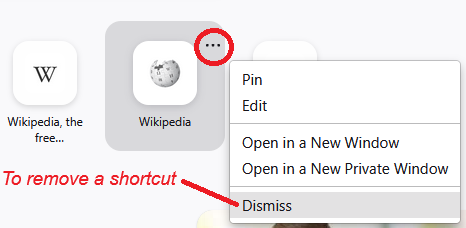
Hi, if you are referring to the Shortcut buttons below the search box, look for "Dismiss" on that little menu.

But - I think Firefox will want to fill any available slots with other shortcuts, so you might want to pin more pages to complete the row and block them out.