


Status bar not hiding in fullscreen video after updating to Firefox 138.0.1 (64-bit) on Windows

Hello,
I recently updated my Firefox browser to the latest version, 138.0.1 (64-bit), on Windows.
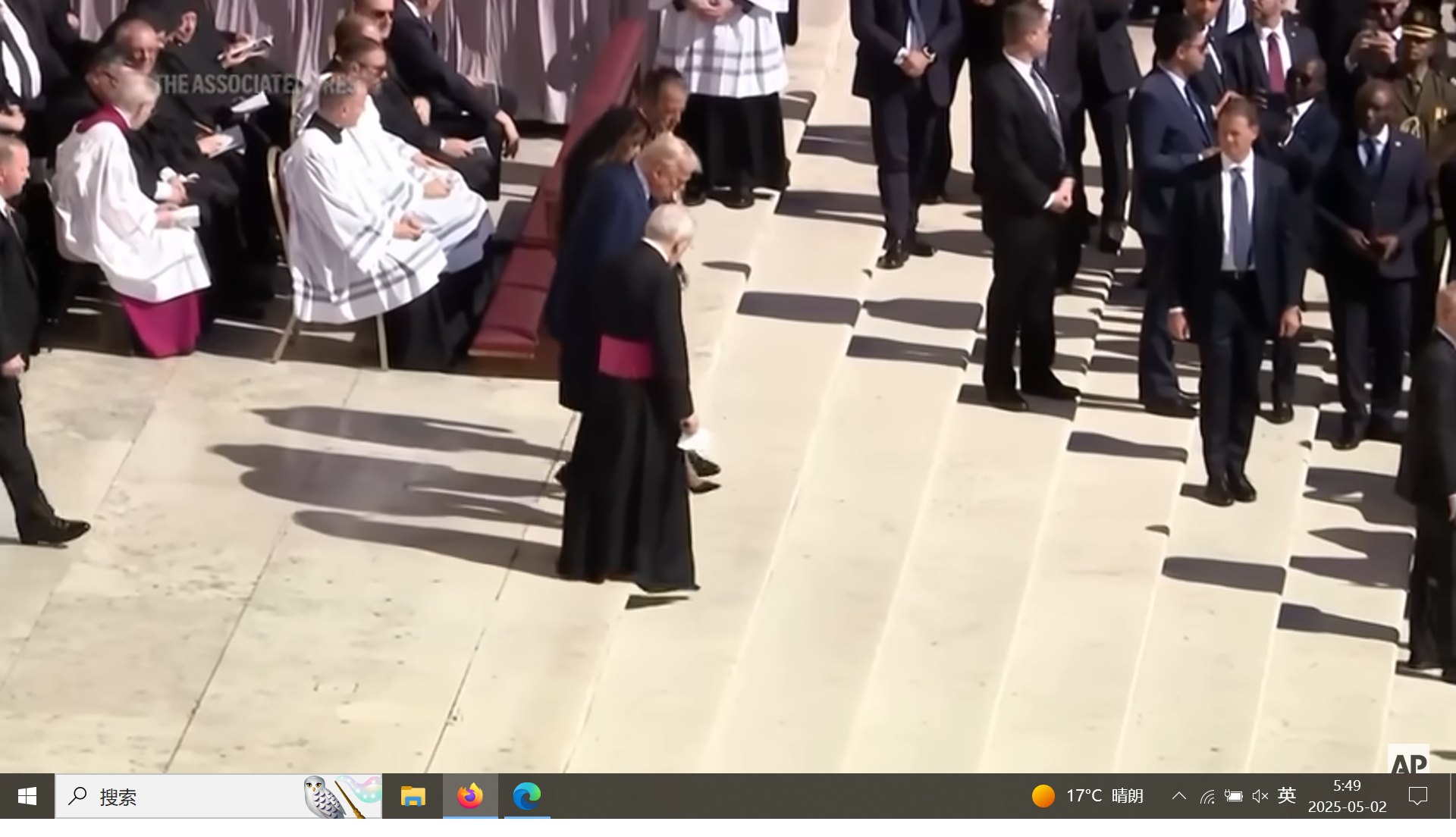
After the update, I noticed that when playing videos in fullscreen mode (for example, on YouTube or other video websites), the Windows taskbar (the bar at the bottom of the screen with the Start menu icon) does not hide automatically. This is affecting my fullscreen viewing experience.
Before updating to version 138.0.1, the Windows taskbar would hide correctly when entering fullscreen video.
I was wondering if anyone else has encountered a similar issue with the Windows taskbar not hiding, or if there are any suggested solutions to help resolve this problem.
Thank you for your help!
ყველა პასუხი (20)
here is the screenshot about the issue.
I have the same problem and its annoying AF. Using latest firefox update and nvidia drivers.
The only workaround is entering fullscreen F11 and then fullscreen the video.
I also have this confusion, firefox on 137.0.2 performance is still normal, but upgrade to 138.0~139.0b3 is in the video full screen when the windows10 taskbar can not be hidden correctly.
But if you first enable the video in picture control, and then the full-screen video can hide the taskbar.
ჩასწორების თარიღი: , ავტორი: rocex
Same problem here...
Same failure here. Works as expected (hides taskbar) on any other browser.
https://support.mozilla.org/en-US/questions/1507663 https://support.mozilla.org/en-US/questions/1510109 https://support.mozilla.org/en-US/questions/1510100
All 4 of these tickets are the same issue. Should be a very simple fix for an incredibly annoying bug.
As a temporary workaround, could you try double pressing Win? Does it hide the taskbar?
We would also appreciate including your Troubleshooting Information.
Denys said
As a temporary workaround, could you try double pressing Win? Does it hide the taskbar? We would also appreciate including your Troubleshooting Information.
No, double pressing Win does not hide the taskbar.
Ok, I am going to create a bug report regarding your issue.
Meanwhile, to make it clear:
- Please try clearing Firefox cache.
- Please try running Firefox in Troubleshoot Mode.
- If possible, please include your Troubleshooting Information. It may help our developer team to locate the issue.
This issue persists in Firefox 139.0.1 in troubleshoot mode.
I am willing to put in some effort to troubleshoot this further if you would like, though I will need some direction.
ჩასწორების თარიღი: , ავტორი: BittenToe

We're looking into this. In the meantime, if you're encountering this problem, changing the setting for `widget.windows.fullscreen_marking_method` in about:config may work around the problem for you. The default is 0, but it can be set to 1, 2, or 3.
If it works for you, please let us know what OS version you're on and what setting worked for you.
Thanks
Hi folks,
just wanted to add here that /user/haftandilian/ is a staff member working for Firefox desktop. We have a hard time rerproducing this bug, so it'll be really helpful for those impacted by this issue to try the workaround suggested above and let us know how it went for you.
Thanks!
haftandilian 说
We're looking into this. In the meantime, if you're encountering this problem, changing the setting for `widget.windows.fullscreen_marking_method` in about:config may work around the problem for you. The default is 0, but it can be set to 1, 2, or 3. If it works for you, please let us know what OS version you're on and what setting worked for you. Thanks
I have tried to change the value from 0 to 1 without luck. The issue persist.
My OS is Windows 10 Home Edition. The detailed system info is:
Windows Script Host
Software Licensing Service version: 10.0.19041.5965
Kiki 说
Hi folks, just wanted to add here that /user/haftandilian/ is a staff member working for Firefox desktop. We have a hard time rerproducing this bug, so it'll be really helpful for those impacted by this issue to try the workaround suggested above and let us know how it went for you. Thanks!
Hey, Kiki.
I can confirm that option 2 works! Else options do not help. Thank you!

Kiki said
Hi folks, just wanted to add here that /user/haftandilian/ is a staff member working for Firefox desktop. We have a hard time rerproducing this bug, so it'll be really helpful for those impacted by this issue to try the workaround suggested above and let us know how it went for you. Thanks!
krave said
Kiki 说
Hi folks, just wanted to add here that /user/haftandilian/ is a staff member working for Firefox desktop. We have a hard time rerproducing this bug, so it'll be really helpful for those impacted by this issue to try the workaround suggested above and let us know how it went for you. Thanks!Hey, Kiki.
I can confirm that option 2 works! Else options do not help. Thank you!
I worked it out the same way. 1,3 not working Thank you! Win10 x64 ltsc 1809
ჩასწორების თარიღი: , ავტორი: maky00
Thanks for trying, folks! That's really helpful for us to troubleshoot this issue further.
Confirming the same activity. Option 2 works as intended, 1 or 3 (or 0) does not. I am on Win 10 22H2 latest
Thanks guys
ჩასწორების თარიღი: , ავტორი: BittenToe
@BittenToe Are you by chance, also on win10?
haftandilian said
We're looking into this. In the meantime, if you're encountering this problem, changing the setting for `widget.windows.fullscreen_marking_method` in about:config may work around the problem for you. The default is 0, but it can be set to 1, 2, or 3. If it works for you, please let us know what OS version you're on and what setting worked for you. Thanks
A user reported setting widget.windows.fullscreen_marking_method to 2 solved the problem for Windows 11.
Kiki said
Denys said
A user reported setting widget.windows.fullscreen_marking_method to 2 solved the problem for Windows 11.Their system details indicate that they're on win 10, though.
If you're referring to Windows NT 10.0 in the user agent string, it is an internal name used for both Windows 10 and Windows 11 (as well as Windows Servers 2016, 2019, 2022, 2025).