


Lost logins/passwords, corrupt logins.json file

Recently lost all login/password data in firefox. After browsing the support I discovered that I have a corrupt logins.json file, around 270kb in size, and a logins.json file around 10kb in size.
Renaming the corrupt file to logins.json doesn't seem to recover the passwords/logins (even temporarily). Tried rolling firefox back to an older version and that didn't work either.
Does anyone have any ideas on how to fix the corrupt file?
Thanks.
ყველა პასუხი (6)
This could be a problem with the key file (key4.db).
You can look a utility to browse System Restore points to see if you can restore a matching logins.json and key4.db pair.
Thanks, I tried using both tools but unfortunately there are no restore points before yesterday so I can't find an older version of either the logins.json or key4.db files.
Is there any way to 'uncorrupt' the logins.json file? When I run firefox now, it creates a new 1kb logins.json file and the larger 270kb file stays reverts to a .corrupt file type.
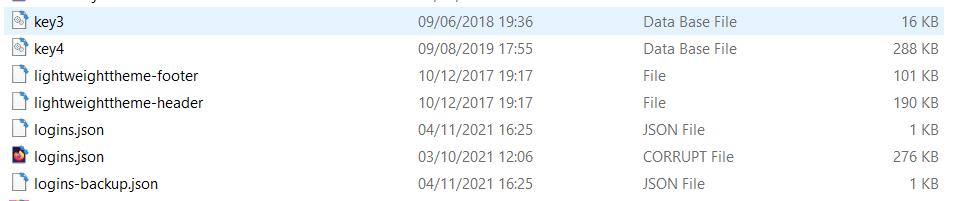

Same problem here.
Sadly I don't have any previous versions/backup saved.
I would be fine with just a way to read the file to get some of those passwords back and avoid the trouble of resetting quite a few of them

In the event that the passwords information is lost, you should record all information in a separate text file somewhere else on your hard drive, or written down. You can easily copy and paste if you need to do so. If you are concerned about someone else looking at that file, you can compress it using a password.
My logins.json file randomly restored with around 95% of my passwords recovered about a week later. No idea why. The corrupt version is also still there.
I would suggest the longer term solution is to switch browser, like I've now done. Firefox is too unstable and unreliable.
Note that you can export the logins to a CSV file in Lockwise.
It is possible that your security software somehow blocked access the the logins.json and/or key4.db, so you can give it another try and boot the computer in Windows Safe Mode.
Make sure to keep a backup of the current logins.json and key4.db files or better try this in a new profile. See "Creating a profile":