


Join us to show up for other Firefox users 🦊. Earn fun badges and Mozilla swag vouchers! Find out more: https://mzl.la/askafox150

Windows 10 reached EOS (end of support) on October 14, 2025. If you are on Windows 10, see this article.

Avatar for Username

ძიება მხარდაჭერაში

ნუ გაებმებით თაღლითების მახეში. აქ არავინ უნდა მოგთხოვოთ ტელეფონზე დარეკვა, შეტყობინების გაგზავნა ან პირადი მონაცემების გაზიარება. რამე საეჭვოს შემჩნევისას გთხოვთ გვაცნობოთ „დარღვევის მოხსენებით“.

ვრცლად

Cursor defaults to address bar

  • 2 პასუხი
  • 1 მომხმარებელი წააწყდა მსგავს სიძნელეს
  • 246 ნახვა
  • ბოლოს გამოეხმაურა Shashank Shekhar
  • დაარქივებული

I use New Tab Homepage because the cursor used to default to the search bar. Now it defaults to the address bar with no option to change it. Searching becomes a two step operation. I either have to erase the address in the address bar to get accurate searches. Or, I have to move the cursor to the search bar before I start the search. This is annoying enough that I have had to change my default browser. Sorry Firefox.

I use New Tab Homepage because the cursor used to default to the search bar. Now it defaults to the address bar with no option to change it. Searching becomes a two step operation. I either have to erase the address in the address bar to get accurate searches. Or, I have to move the cursor to the search bar before I start the search. This is annoying enough that I have had to change my default browser. Sorry Firefox.

ყველა პასუხი (2)

Some new tab extensions give you control of whether the cursor is placed in the page or in the address bar. For example: https://addons.mozilla.org/firefox/addon/new-tab-override/

If you really prefer New Tab Homepage instead, ask its author to add this feature.
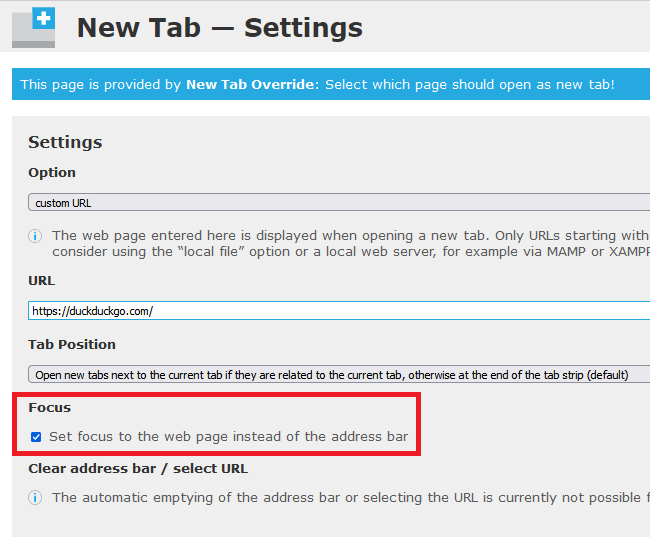
my mistake

ჩასწორების თარიღი: , ავტორი: Shashank Shekhar