


Remove suggested website from the drop-down list at the top of Firefox pages.
How do I remove a suggested website from the drop-down list at the top of Firefox pages? Highlighting the website I want to get rid of and then depressing Shift and then Delete doesn't work. This is what's currently recommended on this support website.
გადაწყვეტა შერჩეულია
Hi downyemerald, the Shift+Delete method should work for matches generated in response to what you type. However, if you want to remove a site from the automatically-opened list of 8 Top Sites from the Firefox Home/new tab page, you need to make the changes on that page.
If you use Firefox Home as your home or new tab page, you an open it by clicking the "+" to open a new tab, or by clicking the Home icon. If you use a different page, you can type or paste one of these addresses in the address bar and press Enter to load it:
- about:newtab
- about:home
Usually the page has a search box followed by the Top Sites section. If your Top Sites section is missing, use the checkbox on the Options/Preferences page to turn that back on: Customize items on your Firefox New Tab page.
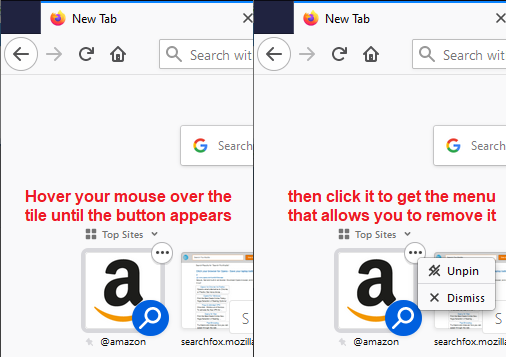
When you hover your mouse over a "tile" in the Top Sites section, a little button should appear. Clicking that button will provide options to unpin or dismiss that site from your Top Sites. Unpin lets the site float into natural order in the list, based on your history. Dismiss blocks that URL from ever appearing in the list. More info in this article: Customize your Firefox New Tab page.

Can you get the list cleaned up the way you like?
პასუხის ნახვა სრულად 👍 0ყველა პასუხი (2)
შერჩეული გადაწყვეტა
Hi downyemerald, the Shift+Delete method should work for matches generated in response to what you type. However, if you want to remove a site from the automatically-opened list of 8 Top Sites from the Firefox Home/new tab page, you need to make the changes on that page.
If you use Firefox Home as your home or new tab page, you an open it by clicking the "+" to open a new tab, or by clicking the Home icon. If you use a different page, you can type or paste one of these addresses in the address bar and press Enter to load it:
- about:newtab
- about:home
Usually the page has a search box followed by the Top Sites section. If your Top Sites section is missing, use the checkbox on the Options/Preferences page to turn that back on: Customize items on your Firefox New Tab page.
When you hover your mouse over a "tile" in the Top Sites section, a little button should appear. Clicking that button will provide options to unpin or dismiss that site from your Top Sites. Unpin lets the site float into natural order in the list, based on your history. Dismiss blocks that URL from ever appearing in the list. More info in this article: Customize your Firefox New Tab page.
Can you get the list cleaned up the way you like?
Thanks so much. The version of Firefox I have is now set up a bit differently than what you described above, but the general roadmap you gave me worked. So, I no longer have Amazon at the top of my list of suggested websites. Since I use it only once a month or less, it was annoying having it spontaneously migrate there . . .